Let’s assume you log onto a bunch of different websites; Facebook, Gmail, eBay, PayPal probably some banking, maybe a few discussion forums and probably much, much more.
Do you always create unique passwords such that you never use the same one twice? Ever?
Do your passwords always use different character types such as uppercase and lowercase letters, numbers and punctuation? Are they “strong”?
If you can’t answer “yes” to both these questions, you’ve got yourself a problem. But the thing is, there is simply no way you can remember all your unique, strong passwords and the sooner you recognise this, the sooner you can embrace a more secure alternative.
Let me help demonstrate the problem; I’ll show you what happens when you reuse or create weak passwords based on some real world examples which should really hit home. I’ll also show you how to overcome these problems with a good password manager so it’s not all bad news, unless you’re trying to remember your passwords.
The tyranny of multiple accounts
Think about it; how many accounts do you have out there on the internet? 10? 20? 50? I identified 90 of mine recently and there are many more I’ve simply forgotten about. There is absolutely no way, even with only 10 accounts, you can create passwords that are strong, unique and memorable.
What happens is that people revert to patterns including family names, pets, hobbies and all sorts of natural, somewhat predictable criteria. Patterns are a double-edged sword in that whilst they’re memorable, they also predictable so even if the pattern might seem obscure, once it’s known, well, you’ve got a bit of a problem.
Patterns and predictable words are bad, but what’s even worse is password reuse. Because we simply end up with so many of the damn things, the problem of memorising them gets addressed by being repetitive. Easy? Yes. Secure? No way.
The problem with weak passwords
Firstly, what exactly is a weak password? Let me answer this in a roundabout way by focussing on strong passwords; a strong password is one which has a high degree of what we call entropy, or in simple terms, one that is as long and as random (in terms of both character types and sequence), as possible. As the entropy link explains:
People are notoriously remiss at achieving sufficient entropy to produce satisfactory passwords.
People struggle with strong password because they revert to patterns that are easily memorable. The patterns may be in a natural form such as someone’s name, a date, or a place or they may be memorable keyboard patterns such as “qwerty” or “123456”. These are all highly predictable patterns.
Let me demonstrate the problem with this based on a few recent events. Firstly we have Gawker who last December were the victims of an attack which lead to the disclosure of somewhere in the order of one million user accounts. Worse still, these accounts were posted online and readily accessible by anyone who wanted to take a look at who had signed up to the service and what their password was.
The interesting thing in the context of password strength is the prevalence of bad password choices. Take a look at these:
123456, password, 12345678, qwerty, abc123, 12345, monkey, 111111, consumer, letmein, 1234, dragon, trustno1, baseball, gizmodo, whatever, superman, 1234567, sunshine, iloveyou, fuckyou, starwars, shadow, princess, cheese
These 25 passwords were used a total of 13,411 times by people with Gawker accounts. The first one – 123456 – was used over two and a half thousand times alone.
Another very similar example was an attack last month on rootkit.com. Password analysis on the breached database showed these top 25 passwords:
123456, password, rootkit, 111111, 12345678, qwerty, 123456789, 123123, qwertyui, letmein, 12345, 1234, abc123, dvcfghyt, 0, r00tk1t, ìîñêâà, 1234567, 1234567890, 123, fuckyou, 11111111, master, aaaaaa, 1qaz2wsx
Look familiar? Worse still, you can easily see the corresponding username if you know where to look (I’ve deliberately blurred these but the originals are still there in the link):
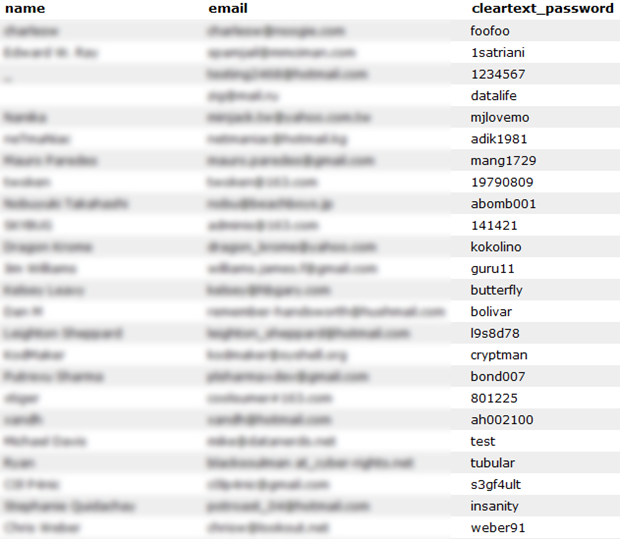
But here’s what’s really interesting about both these cases and the relevance to why password strength is important – all of these were stored in an encrypted fashion in the database. Without delving into cryptography concepts, the crux of the problem with both these sites is that the encryption was implemented badly.
When a database such as rootkit.com is released into the wild with poorly implemented encryption, hackers are able to recreate the encryption process by feeding in a dictionary of common passwords and attempting to compare them to the database to find matches. The nature of encryption can mean this process needs to be repeated millions of times, but it’s an entirely automated process.
Password dictionaries are commonly available (wonder if you see any of yours in there?), as is the software to run them against the breached database. The biggest limitation is the computing power required to perform a fairly resource intensive process but as we all know, compute power is increasing at a very rapid pace and besides, you can easily acquire enough processing power to test 400,000 passwords per second for only 28 cents per minute.
But the bottom line is this; if your password conforms to a recognisable pattern, there’s a good chance it will either be in a password dictionary or guessable based on other known information about you (wife’s or kids name, etc.) If it is short or doesn’t contain sufficient variations in characters, the number of attempts required to guess it are going to be much lower; you become the low hanging fruit.
The problem with password reuse
You’re probably already aware that you shouldn’t be reusing the same password in multiple locations, but let me illustrate as clearly as I can, from a firsthand perspective, why not. Here’s what was waiting for me in my email when I logged on recently:
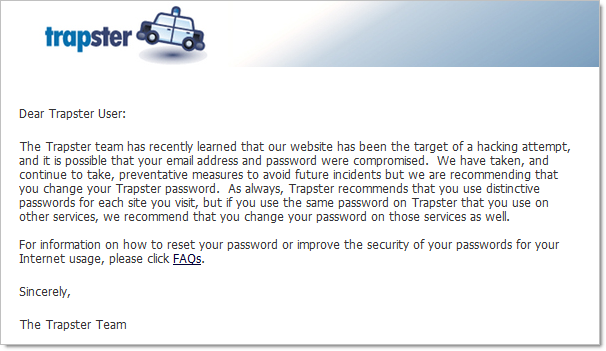
In case it’s not perfectly clear, having your email address and password compromised isn’t exactly ideal. When the scope of those credentials is one website, it’s an inconvenience. However, if those credentials were reused across your financial institutions, your social networking sites or particularly your email account, that’s not inconvenient, that’s downright scary and potentially very expensive for both your hip pocket and your reputation.
Only the day after the Trapster incident, tweets like this started popping up:
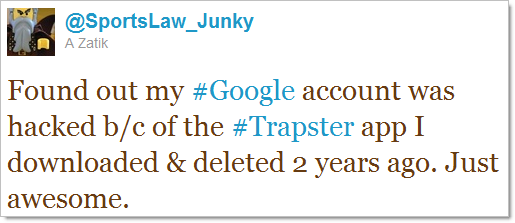
Going back to the Gawker incident I mentioned earlier, shortly afterwards, something odd started happening to the Twitter accounts of people who also had accounts with Gawker; they started ranting on about Acai berries.
This is a crystal clear example of what happens when you reuse credentials. The Gawker database was large enough and the whole password reuse phenomenon rampant enough that the perpetrators were bound to compromise a lot of Twitter accounts. What these incidents are showing us is that based on real-world data analysis, password reuse is alarmingly high.
Undoubtedly, much of this problem is related to poor security implementations on websites. It’s very, very easy to build websites with fundamental security flaws. Another problem in this area is that all too often software developers take the attitude of “The information on our site isn’t that sensitive so security isn’t too important”. Of course if you’ve gone and used the same credentials for that site and your PayPal account, you could have a serious problem just around the corner.
Because we all reuse usernames – and often your username is your email address so there’s not much choice – it’s a very short hop from one compromised account as a result of a database disclosure to another compromised account simply by matching usernames and passwords. In fact there’s a school of thought that usernames betray you and Hotmail even recently gave you the ability to easily create additional email addresses which could mitigate the risk of matching accounts but that’s probably going a little further than what you really need to right now.
Just how prevalent is this sort of thing?
Very. Gawker, rootkit.com and Trapster are all very recent examples but there are many, many more. Into online dating? You’ve probably heard of “Plenty of Fish”:
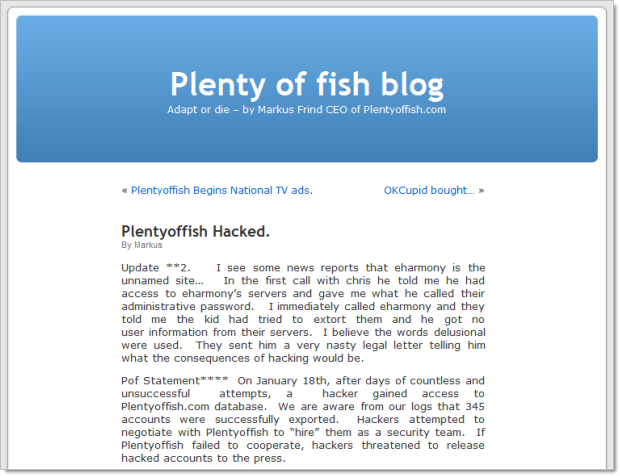
Like the scented, soapy goodness from Lush? Their UK site got hit earlier this year:
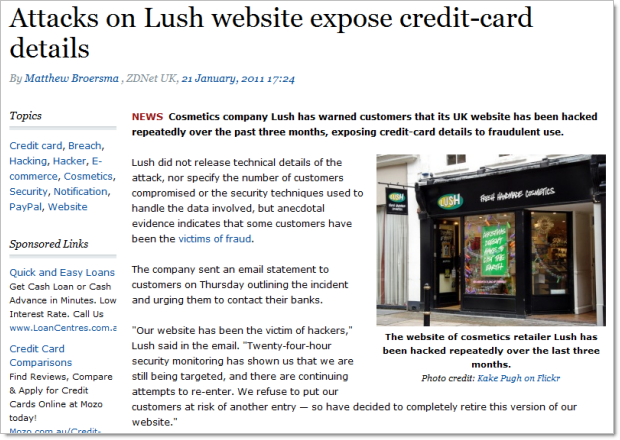
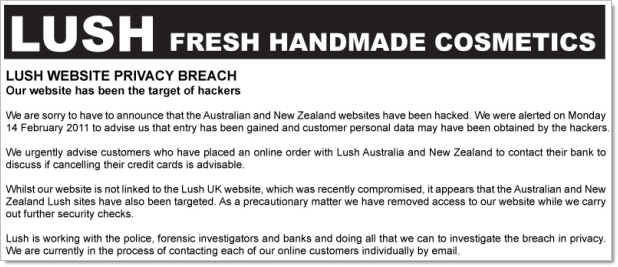
Not in the UK and think your Lush details are safe? Not quite (but don’t worry, the incidents are “unrelated”…):
Of course these were all very targeted attacks. Malicious computer activity goes well beyond this and is often very indiscriminate. We’re now at about 50 million viruses and counting, 20 million of those having hit people just last year.
I’m making these points not to scare you, rather I’m trying to make it evident that this is a very, very common thing indeed. The examples above are just a few of the ones we actually know of from very recent times. There’s a significant order of magnitude more where your credentials have been exposed that we don’t know of, and probably a good proportion of those where the website operators don’t even know of the breach. This is commonplace folks, and it’s up to you to make a preemptive strike against the bad guys.
The myths of “secure” passwords
First and foremost, the word “secure” is frequently thrown around like it’s an absolute term. It’s not. Look no further than the Stuxnet virus; computers running the centrifuges in Iranian nuclear facilities entirely disconnected from the internet were successfully targeted by the virus. Surely those systems would have been considered “secure” by any reasonable definition of the word.
It’s a little bit like saying a car is “safe”. Some are better than others, no doubt, but at the end of the day it becomes a risk mitigation exercise. You trade some things off – such as the simplicity of a password or price paid for a car – and you get a better risk profile in return such as longer to crack the password or more airbags in the car.
Here’s how some people (Google, in this case), believe you should create – and remember – secure passwords:
Seriously? Can you imagine trying to remember dozens of “I love sandwiches” style of passwords? Keep in mind you need to remember what the phrase was, which characters you substituted and which one you used for which site.
Besides, the whole idea of strong passwords is to avoid predictable patterns. Is substituting an “@” in place of an “a”, or a “3” in place of an “e” really going to throw the bad guys off the scent? Memorised patterns with substituted characters are a very thin veneer of security and trust me, the bad guys have heard of this trick.
In fact, the password dictionary I linked to earlier contains many common occurrences of character substitution. In there you’ll find examples such as “s@yg00dbye” and “s0cc3rRul3s” – not exactly “secure”.
Writing your passwords down on paper also isn’t going to do you any favours. Because you’ve got so many of them (and face it, you do), you’re going to need to also write down which account the password belongs to which means you’ve got the mother lode of credentials sitting there ripe for the burglar / kids / nosy guests.
The other problem with handwritten account details is that these days many of us are logging in to many different locations such as the home PC, work PC and increasingly, our mobile devices. We can’t practically have the keys to our online world locked away in a drawer somewhere – it’s simply too big of an inconvenience for many people.
And finally, the handwritten strong password is just too damn painful to continually re-enter every time you logon somewhere. Remember, a strong password is very long and very random; exactly the attributes which makes manually typing them tedious and error prone.
So what about just storing them in a Word doc or in a notes system like Outlook? Because they’re just too easy to steal and when this happens, they’re easy to extract because they’re not encrypted. Someone gets their hands on that file and you are well and truly compromised in a most unpleasant way.
Liberating yourself from the tyranny of passwords
At face value the title of this post sounds odd. How on earth can you continue logging on to websites if you’ve forgotten all your passwords?! You need a dedicated password management system, pure and simple. There is just not another practical and secure way of dealing with it in the current day.
Fortunately there are tools out there focussed at doing just that. For example, there’s LastPass, KeePass and my personal favourite, 1Password. All of these tools give you the ability to record all your passwords in a single, strongly encrypted location. Of course you still need a password in order to unlock the encrypted file, but as a couple of the earlier mentioned product names suggest, you only need to remember a single one.
Here’s the critical point: this single password must be strong! If you’re going to lock up the keys to every single website with just one password, you can forget about birthdays and kids names and sandwiches, you really need to pick something decent this time.
The 1Password approach
Running 1Password, let me show you what happens when I log on to a website in the traditional way. I’m going to log into Slashdot which is a bit of a techie website but the process is pretty much the same for almost every website out there.
We start off with the usual username and password:
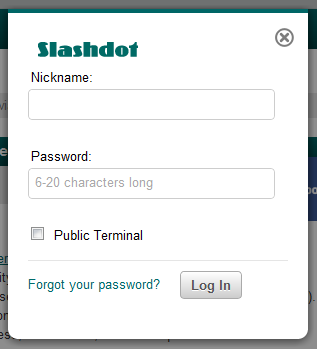
But after I hit the “Log In” button, 1Password offers to save the credentials:
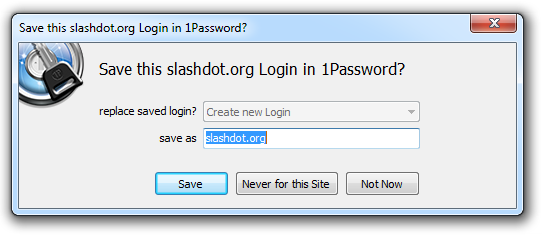
The name defaults to the address of the page but I can always rename it to something more logical either now or a little later on. Once I hit the “Save” button, 1Password asks me for the “Master" Password”, that is the single password required to manage all my other ones:
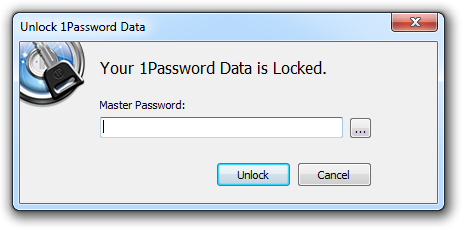
This is one, single, strong password which I have memorised. In fact it’s now the only one I’ve memorised and no, it’s not “Iloves@nDwich3s”!
With this saved, let me now log out of Slashdot then go back and attempt to login again but this time, rather than entering my Slashdot credentials (which I’ve conveniently and deliberately forgotten), I’m going to hit the little key icon to the right of the URL bar:
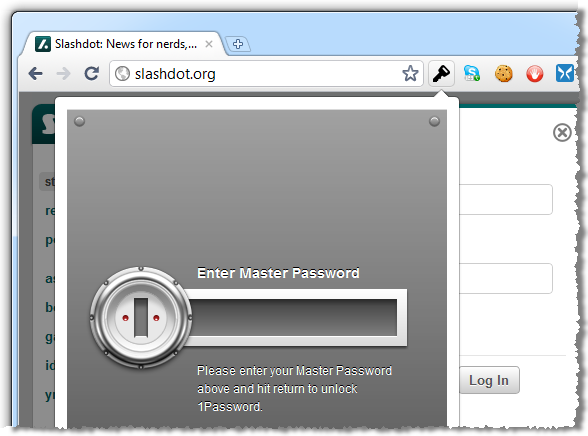
This is now asking for my master password again – the only one I ever need to remember. After entering this, I can see the entry created earlier on:
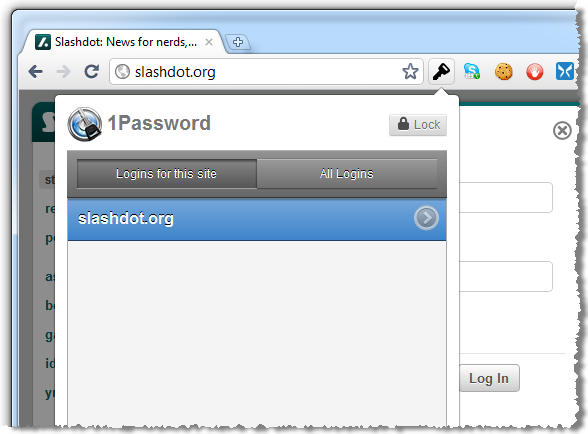
I could have multiple entries in here (you might have more than one account at a particular site), but I’ll just double click on the existing entry. And that’s it – we’re now logged on!
The beauty of this process is that it’s identical for every single site. I don’t need to remember those 90 odd passwords any more, I simply need to go through the motions of manually logging onto each site once and allowing 1Password to save the credentials.
You can also do this from different browsers. I’m using Google Chrome in the examples above but 1Password also integrates with other browsers.
Getting secure
Of course the chances are your passwords aren’t real secure to begin with and all this process is doing is keeping a secure record of bad passwords. This is a great time to do some housekeeping and 1Password makes it very easy.
When I went through and added all my accounts, each time I came across one with a weak password I went into the 1Password application, opened up the account I just created and generated a new one. There’s a really neat little tool built right in which makes this a breeze:
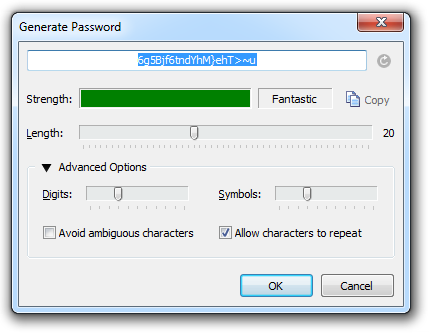
This is what a secure password looks like (highlighted in blue above). If it’s not something you need to be a savant to memorise, it’s not secure enough. But of course with the process described above it doesn’t matter that the password is entirely unintelligible, all you need to remember is your master password.
Now, this process won’t actually change your password on the website, only the one you have recorded in 1Password. You’ll need to copy this one into your clipboard then go onto the individual website and change it accordingly. Yes, it’s a bit of mucking around but for the sake of a few minutes you’ve just created a very secure, very unique password which can’t be used against you on any of your other online accounts.
There’s one gotcha in all of this; some websites don’t let you create secure passwords. Earlier this year I wrote about the Who’s who of bad password practices – banks, airlines and more where I found that some websites – especially banks, oddly enough – simply won’t let you construct long, random passwords. Either they limit the length to a very low number, they disallow many character types or in extreme examples, they insist on a short PIN containing only numbers. Unfortunately you’re entirely at the mercy of the controls these sites place on passwords so when you hit a limitation like this all you can do is maximise what you can within a ridiculous constraint.
Taking your passwords with you
One thing that was important to me was that I could access my passwords from any location, on any device, at any time. Work PC, home PC, iPad and iPhone all needed to sync up.
1Password lets you do all of this by using the Dropbox file syncing service. This is a great product which has proven very robust and is easy to configure to keep your 1Password file synced. In the end, it means all my PCs have the same secure password file and my iPad and iPhone respectively have friendly little apps like these:
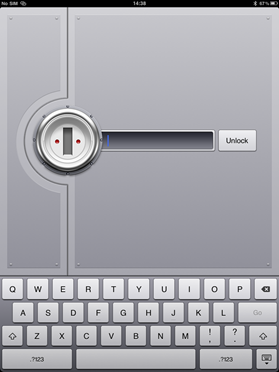
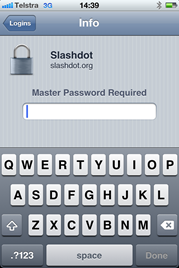
Is it risky putting the password file online? Well there’s a degree of risk, sure, but the Dropbox service has proven a very secure implementation over the years. And of course the 1Password file is still securely encrypted so even if someone gets their hands on it, they still need the (strong) master password. In fact the weakest link in the whole thing is probably the password you secure your Dropbox account with which, by now of course, is also very strong :)
Isn’t this “all your eggs in one basket” stuff?
Yes, it is, but it’s a basket that is very well thought out and very firmly secured. Someone would have to firstly obtain the file containing all the passwords exposed and secondly have your master password either disclosed, guessed or brute force attacked, none of which should happen if you choose one securely.
Whilst having all your account details exposed at once is undoubtedly a very bad thing, the risk is infinitesimal compared to the chances of having it breached via website.
Of course the other risk is that an as yet unknown vulnerability is found with the 1Password software. Certainly what we’d call a zero-day vulnerability (one that is not yet known), is possible. In fact there was one found in LastPass just last month and to their credit, they plugged that hole in no more than a few hours. And that’s the point with professional products of this nature; their entire being is centred on offering a secure solution and if a vulnerability is found, you can be pretty damn sure it’s going to be squashed very quickly.
Summary
So now that you’ve got all this super security, you’re pretty much invincible right? Uh…
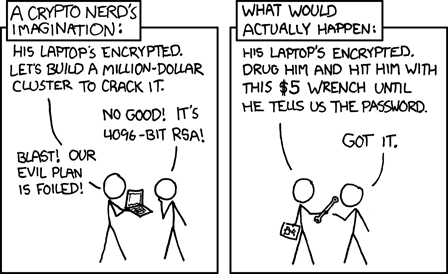
And this brings me to a neat philosophical conclusion; security is all about risk mitigation -you never actually become “secure”, you merely decrease your risk. On balance, the risk of your account details sitting out there in even a very secure website is significantly higher than having them sit there in your 1Password file.
But beyond just security, the password manager route is a very handy solution. Having all your accounts handy on all your devices and being able to simply logon with the once strong password is a very convenient route indeed.
And finally, when the time comes that you realise one of your accounts has been breached (and trust me, it will come), it’s no good thinking about password security then – it’s too late. So put aside a few hours one afternoon, spend just a few dollars and get yourself organised. Either that or start developing a taste for acai berries!


Software architect and Microsoft MVP, you’ll usually find me writing about security concepts and process improvement in software delivery.


46 comments:
Publishing your passwords on the Internet?? Even using drop box it sounds like you're undermining all the effort you just went through to prevent password reuse. And how are you supposed to manage your Dropbox password in this system?
A much easier solution is to use something like http://passwordmaker.org/ which just does a one way hash with your "master password" and the domain or app name. Now your passwords are all algorithmically generated so you don't have to store them anywhere.
Saying that syncing a strongly encrypted file protected with a high entropy password across an encrypted connection to a privately accessible Dropbox account is "publishing" is probably using the term a bit liberally! It's a synchronisation process and as such you retain an instance of the password file locally so the Dropbox credentials are accessible from there.
Frankly, so long as people are generating strong, unique passwords and tracking them using a robust, well proven tool (of which there are many), who makes the product is the least important part of the equation.
It's a pet peeve of mine when the weak passwords in the Gawker database are used as some kind of evidence that people are bad at making strong passwords. I had an account there, with my throwaway password, which wasn't on your top 25 list but is a single English word.
Why did I choose such a bad password? Because I don't care about my Gawker account. So why should I choose a password I can't remember, encrypt it in a strong file on my dropbox and then have to go get it every time I want to write a semi-anonymous comment?
I would guess that at least 75% percent of the top 25 list's uses are from throwaway accounts made because Gawker makes everyone who comments have them.
Heck, Bruce Schneier recommends using one easy throwaway password for sites you don't care about. Seems like good advice to me. Good luck brute forcing my bank password, but Gawker... you can have it for free if you like.
You have http://www.keepassx.org/ for free on Win/Mac/Linux. Shame it doesn't have an Android/iOS version, but still..
Anonymous,
You should care about your Gawker account, because chances are likely you somehow possibly identified yourself inadvertently there.
The best is to just create a strong password for every site, and use KeepassX or 1Password religiously to manage (and autofill) those credentials.
btw, Autofill isn't just for lazies, it adds security by avoiding phishing attacks (the tool will look for exact domain name matches as opposed to UTF8 name-alikes or other spoofed URLs).
Troy, you miss also Passpack, great for secure sharing
I use keepass (and yes, there is an android version) for my pw management. One tip I have: if a site requires a "security" question, generate the answer with keepass and store it in the notes section of that entry. Security questions are pretty stinking insecure.
-zach
Great post Troy. I'm glad you've finally seen the light :-)
Thanks for this terrific post on educating about passwords (which I first read on lifehacker). I 100% agree with all you've said and have done my own educational efforts along these lines, here:
http://www.filterjoe.com/2010/05/14/password-management-for-the-average-joe/ (first in a series of posts)
I repeatedly hammer home the following advice:
"Use a password manager to assign unique, random 15 character passwords for all accounts, protecting them with a strong master password."
A couple points to add:
You mentioned 3 out of the 4 password managers that are most popular in general (and with lifehacker readers) and they're all great. The 4th is RoboForm which is a good choice for Windows-centric users, and can take advantage of the Dropbox method you outline as well (or you can use their online syncing if you prefer)
I've talked with Simon Davis of RoboForm about how often master passwords get captured by keyloggers. He was not aware of this ever happening to a RoboForm user. I also search the internet periodically to see if any users have ever reported having the master password keylogged. Haven't heard of this happening yet. So yes - this is far more secure than the usual methods employed by people.
An interesting thing to think about is just how many forms of common password theft are stopped through the use of a password manager. Lots of them, as it turns out, and even the ones that aren't stopped can usually only compromise a single account. I go through each of the common forms of password theft, one by one, and whether a password manager stops them, here:
http://www.filterjoe.com/2010/05/14/how-attackers-steal-passwords/
Thanks again for cross posting this to lifehacker. The more people adopt password managers and use them the way you and I suggest, the less password theft will occur.
Thanks for you comments Joe, that last link about how attackers steal passwords is excellent. Really like the breadth and structure (and seeing tabnapping make an appearance).
Recommended read people! -> http://www.filterjoe.com/2010/05/14/how-attackers-steal-passwords
If the master password file is local-only, and is not backed up, all account access is lost if the machine is lost or corrupted. If it is backed up online, see below.
If the master password file is stored or synced remotely, then a keylogger becomes a complete disaster. Most keyloggers from organized groups report remotely. Once the master password is recovered and changed remotely, the user is not only completely compromised but has lost all account access.
AV-Comparatives and other independent testers show pitifully low detection rates for keyloggers from all of the major AV providers. The recent proven malware attacks on Android are only the faintest glimmer of a new dawn of attacks on mobile OSes. Keyloggers are much more of a threat than password attacks if the user is using even a basic level of password security, i.e. no dictionary words or top 10 popular passwords.
A 4-6 digit numeric PIN is considered secure by almost every financial institution because there will effectively never be an offline attack. Only a tiny number of attempts can be made. The chances of an offline attack on Google, Bank of America, etc are vanishingly low. No one will ever run a distributed rainbow table attack on Google's hash tables. I heard someone describe the chances of GUID collisions as "The chance of a collision is so low, so profoundly low, that improving any other aspect of the code would be a more effective use of time". The same could be said about generating a password that will resist an offline rainbow table attack on Google.
An 8 character alphanumeric password (no symbols, even!) is more than enough to guard against direct attacks on almost any online site. Local passwords for OSX and Windows are meaningless if physical access is compromised.
Do any of the popular managers keep track of security questions? The mandatory use of security questions in most sites these days is much worse than major banks not accepting symbols in passwords, from the standpoint of practical exploits.
Summary: Password managers are certainly better than 'letmein', but there are disastrous consequences when pitted against the rise of the keylogger as the tool of choice of most of the organized cybercrime world.
Anonymous: While what you say is scary and possible, I've done some research and found that there has been literally zero cases reported to date of someone with a strong master password getting the master password keylogged, when using one of the 4 most popular password managers.
Furthermore, let's look at the password manager and dropbox combo and imagine your disaster scenario happens. I personally have 3 computers, one which is used only occasionally. All share the same RoboForm password database. PLUS I have my RoboForm passwords manually synced to my blackberry.
The first time my master password stops working, I'd know I was in big trouble. One computer down, and it has been changed in my online dropbox account. To recover from this, I simply disconnect my rarely used computer from the internet and turn it on. No sync yet from dropbox, so I can move the passwords to a different location, and they won't be synced. And then I can begin the lengthy process of changing all my passwords, starting with important ones first.
Even in the event all that fails, (and my dropbox account has been taken over - so I can't use the revision history to get back an earlier version of my RoboForm passwords) I still have the manually synced passwords on my blackberry, which will be current to the last time I synced. If it was a month ago, then I've lost whatever changes happen in the past month.
Note also that lastpass and keypass offer 2 factor authentication options, for those who want the extra layer of protection of the master password.
This is all good advice (I use KeePassX personally).
However, I'm paranoid, and I'm uncomfortably aware that I'm only a keylogger away from divulging every password I have. So if you use any of these tools, think carefully before typing your master password into a friend's/relative's/public computer...
A very interesting article, with good advice.
However... :)
A while back I came up with an alternative solution.
Using my solution, which I call the 'One Ring' (see * below), I can honestly answer 'yes' to both of the questions you ask at the outset ('Do you always create unique passwords such that you never use the same one twice? Ever?' and 'Do your passwords always use different character types such as uppercase and lowercase letters, numbers and punctuation? Are they "strong"?').
Your article goes on to state 'there is simply no way you can remember all your unique, strong passwords' and 'there is absolutely no way, even
with only 10 accounts, you can create passwords that are strong, unique and memorable'.
I accomplish both using the 'One Ring'.
As you rightly say, it's about risk management. Your choice of solution involves compromises. I can think of three in your solution:
1) should your '1password' software become corrupted, you would lose access to every one of the websites you use it to log into.
2) we can argue about whether using 'Dropbox' constitutes 'publishing' your keyword database, but any system that allows you to access this from anywhere on the net makes it potentially open to attack. No matter how strong your master password, at some point in the future you might find that it has been compromised -- Moore's Law is still in force, and computing power continues to increase. Also, while I've no doubt that you will have chosen a 'fabulously' strong master password, I wonder how many people will use a password manager and then -- perhaps unknowingly -- use a password that's really not strong enough for the job?
3) the use of any third-party system requires implicit trust in the third party. Should the ownership of your password safe be acquired by a bunch of crooks, all your assets are immediately compromised. It's not inconceivable that organised crime might well invest in the purchase (or alternative acquisition) of a password management software company knowing that this would provide them with access to a great many individual online bank accounts.
My 'One Ring' alternative also involves compromises. But it also has several advantages over the password safe technique (as I've detailed at
http://pendantry.wordpress.com/2011/04/14/passwords-storing-passwords/).
I would be very interested in your thoughts on http://pendantry.wordpress.com/2007/03/31/passwords-one-ring-to-rule-them-all/.
* I note with interest the first comment to your article by cwlq - I wasn't aware of http://passwordmaker.org/, and I find it
intriguing that that system uses the same 'ring' simile as I did for mine. It's a funny old world!
(PS FYI: there is a bad link on your article at 'usernames betray you' to http://www.technologyreview.com/web/32326/?p1=A4&a=f)
Thanks for the feedback Colin, any good rational discussion about sensible password practices is a worthwhile one. I think your approach is good and as you say, they all have their trade-offs.
The main sticky point for me would be the edge cases which mean committing more to memory than I would ideally like. For example, sites which prohibit either the length of character set that the “One Ring” approach requires (I wrote about these recently in the who’s who of bad password practices: http://troy.hn/dJbdTU). It’s a similar issue if the site you’re using is compromised and you need to change the password (or you do it as a matter of practice) as the algorithm no longer applies.
The one point I do think misses the mark is the comment in your original post about “password managers aren’t much more secure than using a single password”. There’s a world of difference between using a cryptographically strong service such as 1Password and using the same password across all your sites which frequently store and transmit them in plain text.
At the end of the day, any approach which permits good entropy and uniqueness across sites is heading in the right direction. The challenge remains moving people away from all too common bad practices and actually getting to the point where the debate becomes as semantic as being about multiple approaches to the same problem. Unfortunately I think we’re a long way away from that.
I take your point concerning the slur I've cast on password managers. My excuse is that it's been five years since I reviewed that text in any depth. I need to do that, as my position has changed -- at the time I was trying to chest-beat about the 'One Ring', but I now agree with you that the important thing is to try to educate people into using something better than what most are using now.
Of course the real problem is that the entire password system is flawed; it's built around a false assumption -- that all users understand the need for security. And it certainly doesn't take account of the natural tendency of today's average Internet user to reuse the same password for multiple sites.
The one who can crack that tiny conundrum will become rich, beyond the dreams of avarice!
@Troy...thanks for this piece - spot-on lad and I used you as a great resource for my own blog piece on passwords too at www.canuckseo.com!
:-)
Jim
Lastpass is another one, I use it, claims to be zero knowledge (ie, they never see your pw, it's decoded on the fly in your browser/app), they have plug ins for most browsers, apps, android (and I asume iphone), etc. Seems to work well enough.
While I love lastpass as the best in class solution, when you combine it with Yubikey for 2 factor authentication it is nearly unbeatable.
http://helpdesk.lastpass.com/security-options/yubikey-authentication/
Lastpass is another one, I use it, claims to be zero knowledge (ie, they never see your pw, it's decoded on the fly in your browser/app), they have plug ins for most browsers, apps, android (and I asume iphone), etc. Seems to work well enough.
A very interesting article, with good advice.
However... :)
A while back I came up with an alternative solution.
Using my solution, which I call the 'One Ring' (see * below), I can honestly answer 'yes' to both of the questions you ask at the outset ('Do you always create unique passwords such that you never use the same one twice? Ever?' and 'Do your passwords always use different character types such as uppercase and lowercase letters, numbers and punctuation? Are they "strong"?').
Your article goes on to state 'there is simply no way you can remember all your unique, strong passwords' and 'there is absolutely no way, even
with only 10 accounts, you can create passwords that are strong, unique and memorable'.
I accomplish both using the 'One Ring'.
As you rightly say, it's about risk management. Your choice of solution involves compromises. I can think of three in your solution:
1) should your '1password' software become corrupted, you would lose access to every one of the websites you use it to log into.
2) we can argue about whether using 'Dropbox' constitutes 'publishing' your keyword database, but any system that allows you to access this from anywhere on the net makes it potentially open to attack. No matter how strong your master password, at some point in the future you might find that it has been compromised -- Moore's Law is still in force, and computing power continues to increase. Also, while I've no doubt that you will have chosen a 'fabulously' strong master password, I wonder how many people will use a password manager and then -- perhaps unknowingly -- use a password that's really not strong enough for the job?
3) the use of any third-party system requires implicit trust in the third party. Should the ownership of your password safe be acquired by a bunch of crooks, all your assets are immediately compromised. It's not inconceivable that organised crime might well invest in the purchase (or alternative acquisition) of a password management software company knowing that this would provide them with access to a great many individual online bank accounts.
My 'One Ring' alternative also involves compromises. But it also has several advantages over the password safe technique (as I've detailed at
http://pendantry.wordpress.com/2011/04/14/passwords-storing-passwords/).
I would be very interested in your thoughts on http://pendantry.wordpress.com/2007/03/31/passwords-one-ring-to-rule-them-all/.
* I note with interest the first comment to your article by cwlq - I wasn't aware of http://passwordmaker.org/, and I find it
intriguing that that system uses the same 'ring' simile as I did for mine. It's a funny old world!
(PS FYI: there is a bad link on your article at 'usernames betray you' to http://www.technologyreview.com/web/32326/?p1=A4&a=f)
This is all good advice (I use KeePassX personally).
However, I'm paranoid, and I'm uncomfortably aware that I'm only a keylogger away from divulging every password I have. So if you use any of these tools, think carefully before typing your master password into a friend's/relative's/public computer...
Anonymous: While what you say is scary and possible, I've done some research and found that there has been literally zero cases reported to date of someone with a strong master password getting the master password keylogged, when using one of the 4 most popular password managers.
Furthermore, let's look at the password manager and dropbox combo and imagine your disaster scenario happens. I personally have 3 computers, one which is used only occasionally. All share the same RoboForm password database. PLUS I have my RoboForm passwords manually synced to my blackberry.
The first time my master password stops working, I'd know I was in big trouble. One computer down, and it has been changed in my online dropbox account. To recover from this, I simply disconnect my rarely used computer from the internet and turn it on. No sync yet from dropbox, so I can move the passwords to a different location, and they won't be synced. And then I can begin the lengthy process of changing all my passwords, starting with important ones first.
Even in the event all that fails, (and my dropbox account has been taken over - so I can't use the revision history to get back an earlier version of my RoboForm passwords) I still have the manually synced passwords on my blackberry, which will be current to the last time I synced. If it was a month ago, then I've lost whatever changes happen in the past month.
Note also that lastpass and keypass offer 2 factor authentication options, for those who want the extra layer of protection of the master password.
Thanks for this terrific post on educating about passwords (which I first read on lifehacker). I 100% agree with all you've said and have done my own educational efforts along these lines, here:
http://www.filterjoe.com/2010/05/14/password-management-for-the-average-joe/ (first in a series of posts)
I repeatedly hammer home the following advice:
"Use a password manager to assign unique, random 15 character passwords for all accounts, protecting them with a strong master password."
A couple points to add:
You mentioned 3 out of the 4 password managers that are most popular in general (and with lifehacker readers) and they're all great. The 4th is RoboForm which is a good choice for Windows-centric users, and can take advantage of the Dropbox method you outline as well (or you can use their online syncing if you prefer)
I've talked with Simon Davis of RoboForm about how often master passwords get captured by keyloggers. He was not aware of this ever happening to a RoboForm user. I also search the internet periodically to see if any users have ever reported having the master password keylogged. Haven't heard of this happening yet. So yes - this is far more secure than the usual methods employed by people.
An interesting thing to think about is just how many forms of common password theft are stopped through the use of a password manager. Lots of them, as it turns out, and even the ones that aren't stopped can usually only compromise a single account. I go through each of the common forms of password theft, one by one, and whether a password manager stops them, here:
http://www.filterjoe.com/2010/05/14/how-attackers-steal-passwords/
Thanks again for cross posting this to lifehacker. The more people adopt password managers and use them the way you and I suggest, the less password theft will occur.
Great post Troy. I'm glad you've finally seen the light :-)
Anonymous,
You should care about your Gawker account, because chances are likely you somehow possibly identified yourself inadvertently there.
The best is to just create a strong password for every site, and use KeepassX or 1Password religiously to manage (and autofill) those credentials.
btw, Autofill isn't just for lazies, it adds security by avoiding phishing attacks (the tool will look for exact domain name matches as opposed to UTF8 name-alikes or other spoofed URLs).
It's a pet peeve of mine when the weak passwords in the Gawker database are used as some kind of evidence that people are bad at making strong passwords. I had an account there, with my throwaway password, which wasn't on your top 25 list but is a single English word.
Why did I choose such a bad password? Because I don't care about my Gawker account. So why should I choose a password I can't remember, encrypt it in a strong file on my dropbox and then have to go get it every time I want to write a semi-anonymous comment?
I would guess that at least 75% percent of the top 25 list's uses are from throwaway accounts made because Gawker makes everyone who comments have them.
Heck, Bruce Schneier recommends using one easy throwaway password for sites you don't care about. Seems like good advice to me. Good luck brute forcing my bank password, but Gawker... you can have it for free if you like.
Publishing your passwords on the Internet?? Even using drop box it sounds like you're undermining all the effort you just went through to prevent password reuse. And how are you supposed to manage your Dropbox password in this system?
A much easier solution is to use something like http://passwordmaker.org/ which just does a one way hash with your "master password" and the domain or app name. Now your passwords are all algorithmically generated so you don't have to store them anywhere.
Fantastic! Now I can completely forget about trying to remember passwords and simply use a 1password style application when I try to visit a website from my wp7 phone, internet-connected tv, video game console, friend's computer...This definitively and completely solves the problem once and for all.
Great read! Thanks for all the useful links
This about passwords is true but, I mean, açaí is actually pretty awesome. I love to eat that "açaí berry frozen" http://en.wikipedia.org/wiki/File:A%C3%A7a%C3%AD.jpg
eat a dick schaab
Troy, thanks for a great article. I hope many people read it.
You really need to attibute that comic near the bottom properly to xkcd. I'm sure many of your readers automatically know who created it, but it's not right that you included it and did not attribute.
> Do you always create unique passwords such that you never use the same one twice? Ever?
Yes.
> Do
your passwords always use different character types such as uppercase
and lowercase letters, numbers and punctuation?
No.
> Are they “strong”?
Yes!
I use randomly generated passwords for most accounts. Since I often have to enter these passwords on small mobile devices, lower case letters are much easier than punctuation characters, digits, or upper case letters.
A randomly generated ASCII character (excluding control characters and space) has any of 94 possible values; that's about 6.55 bits of entropy per character. A randomly generated lower case letter has any of 26 possible values, 4.7 bits per character, for a ratio of about 1.4. So a 14-character password like mfsphenhecqdet is as secure as a 10-character password like O#r1\4gI%U, and *much* easier to type. (Copy-and-paste isn't always an option.)
Unfortunately, some sites require me to use a mixture of upper and lower case letters, digits, and punctuation. (On the other hand, such requirements probably do improve security for 99% of users.)
Incidentally, as far as my bank knows, my mother's maiden name is "iwhijszitvqbtc" and my 1st-grade teacher was "zvboduykzlhzfz" (or something equally random).
Hmm. The password databases that got released weren't "encrypted". They're hashed, there's a difference. :)
Also, would you still recommend dropbox? Given their past exploits of allowing access to your account WITH NO PASSWORD.
Have you looked at spideroak? They encrypt data client side and store it encrypted on their servers.
Thanks for your feedback, the comic does link back to the source on xkcd.
Of course if you add enough characters of one type you can statistically reach the same entropy as shorter strings of greater variety - you could make the same argument about numbers (with an obvious length impact). Of course once you start reaching 14 characters - assuming each site allows that length - you're not going to be able to make them both unique and memorable across all your accounts anyway so you're back at needing a password manager. Once you're there, the password usability is irrelevant as you're not typing it in anyway (with a small number of notable exceptions). Your two examples in the last sentence are perfect evidence of this.
I should have said "stored cryptographically" as opposed to "encrypted". My bad.
I'm aware of a couple of issues Dropbox has had such as last month's window of no auth and the reuse of authentication tokens (the latter is a little dubious). I'm not aware of any incidents of successfully exploiting the service, although I'm happy to be proven wrong if this has indeed happened.
On balance, I'm happy with the 1Password plus Dropbox approach, I think it's one of the best combinations of security and usability going. The keychain is still encrypted with a 128 bit key and the effort to brute force this without the master password puts it well and truly into the realm of highly improbable.
Hi, Thanks for the informative article. I have one quesiton:
Following the recommended strategy, i will no longer be able to log in to any site I include in this on a computer, on which I have not installed 1Pass (or equivalent), AND dropbox. Is that right? There is no alternative way to to get at my password without those softwares?
Yes and no. Certainly the most expedient fashion of logging on is to have 1Password installed on the PC and multiple devices do require Dropbox to sync. However, there are times when you need to authenticate either on another machine (internet cafe, perhaps) or a device which won't support 1Password (Apple TV is a good example). In these scenarios I refer to the password on my iPhone which runs 1Password and syncs via Dropbox (there's also an Android client). Of course you need one of these two devices but it does mean you have your encrypted keychain with you wherever you go.
Thanks for clearing that up!
Hmm, one thing you haven't mentioned is machine login passwords. There's no way to remember a random 20 character password for a machine console login. Suggestions?
(It has to be something you can remember, since you might not have access to your smartphone for whatever reason and you can't get to your password database.. because you're not logged in!)
Fingerprint scanner :)
You're right though, password managers don't work well in this context. I do tend to use something memorable (albeit strong), and it remains one of the only exceptions where I can't apply true randomness.
Having said that, I do use 1Password and totally random passwords for other domain level logins where I remote into the machine and I simply copy and paste the password from the host.
I love the idea of IronKey, it's only the lack of support for mobile devices which lets it down. Unfortunately as we increase our reliance on these, the dependency for physical media based account management becomes impractical.
The passwordmaker solution advocated by cwiq would be good except that so many sites have weird restrictions on password length or character set. I often found myself going to passwordmaker, generating a password and then having it rejected because it was too long or contained "illegal" symbols. Then you have to set passwordmaker to generate a shorter or simpler password for the site. The result is that you have a hodge-podge of exceptions, which means that you lose the benefits of passwordmaker.
I have moved to keepass because of that. When you need to record password details for a lot of sites anyway, you might as well just use a password manager. YMMV
Here's the solution that I use: Lastpass+Yubikey. You need a strong but easy to remember password to get into Lastpass. Then you need to insert the Yubikey to generate a one-time password. And you can disable the Yubikey on a trusted machine.
The one weakness? Your e-mail account. Someone who hacks your e-mail password can claim that the Yubikey is lost and then confirm it by respond to the e-mail. Solution: Use a different two-factor authentication, such as Google Authenticator or text-message authentication with Gmail.
Post a Comment