Observations, musings and conjecture about the world of software and technology

The science of password selection

A little while back I took a look at some recently breached accounts and wrote A brief Sony password analysis. The results were alarming; passwords were relatively short (usually 6 to 10 characters), simple (less than 1% had a non-alphanumeric character) and predictable (more than a third were in a common password dictionary). What was even worse though was uniqueness; 92% of common accounts in the Sony systems reused passwords and even when I looked at a totally unrelated system – Gawker – reuse was still very high with over two thirds of common email addresses sharing the same password.

But there was one important question I left unanswered and that was how people choose their passwords. We now know that structurally, passwords almost always adhere to what we would consider “bad practices” but how are these passwords derived in the first place? What’s the personal significance which causes someone to choose a particular password?

It turns out there are some very recognisable patterns in the data. In fact the vast majority of passwords adhere to just a small handful of common selection practices. This is interesting research in that it begins to give a bit of insight into the thought process of the individuals who create passwords which conform to weak structural guidelines.

Source data and analysis process

The data I’m going to analyse comes from a variety of sources including the Sony and Gawker breaches I referenced in the previous post as well as other LulzSec releases including pron.com and a collection of their random logins. For each of these I have nothing more than an email address and a password – there are no other account attributes I can use to start drawing conclusions (i.e. physical address). There are about 300,000 accounts in all which should give us a reasonable cross section with which to make some observations on password selection.

There are three other sets of source data I’m going to use in this analysis:

  1. People names: this includes a list of about 26,000 common first and last names.
  2. Place names: this is everything from towns to states to countries and includes about 32,000 entries.
  3. English dictionary: exactly what it sounds like – around 190,000 words in a typical English dictionary.

I’m going to use these three sources of data to make some assumptions about where passwords may have been derived from. The three lists above are aggregated from various sources and whilst comprehensive, are certainly by no means complete. The bottom line is that some potential matches are going to be missed and the overall numbers will be lower than what they would be if the lists were 100% accurate.

In matching passwords to potential sources I’m going to be a bit more liberal than usual by ignoring both case and punctuation. Whilst these are extremely important to password entropy, they don’t have a part to play in terms of where people derive their password from. Whether I use “Troy” or “troy” as a password (and no, I don’t use either!), or “Troy Hunt” or “troyhunt”, I’ve still derived them from the same logical source. Besides, in my previous analysis 45% of all passwords contained only lowercase characters and as I mentioned earlier, less than 1% had any sort of punctuation anyway so it wouldn’t make a difference for a significant portion of the data set.

In the analysis I’m going to start with the most personal sources – such as someone’s name – and then move onto increasingly less personal sources such as places, then dictionary words and see how many passwords correlate to each. In a case like “June” where it could be either a name or a dictionary word, it will appear in whichever statistics I run first (people names, in this case), then won’t be counted again so we’ll get a discrete set of matches. The order of the results is more a logical priority than one of prevalence.

People names

I’ve started with people names because a name is simply one of the most personal attributes of someone’s identity. I also suspect they feature heavily when someone reaches into the recesses of their mind to come up with a password. Now of course the name is not necessarily the name of the account holder; it could be a spouse, the kids or even the family dog. Furthermore, it could be a first name, a middle name or a last name.

Here’s how they break down in terms of their prevalence within the total password set:

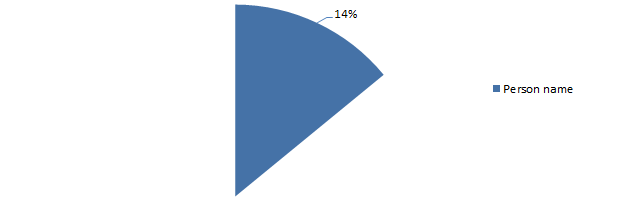
Passwords derived from a person’s name
Passwords derived from a person’s name

So what this graph is saying is that 14% of people create their password based on a person’s name. What does this look like? Well, pretty predictable really, here are the top three names as passwords:

  1. maggie
  2. michael
  3. jennifer

But there’s a bit more to the story; just because a password is derived from a person’s name doesn’t mean it’s a perfect match. For example, prepending or appending numbers to a name is a popular practice so whilst “troy21” may not be a perfect match to my name, the origin of it is still clear.

There are three common derivatives of a name which frequently appear in passwords:

  1. The addition of numbers
  2. The addition of symbols (possibly along with numbers)
  3. Reversing the name (with or without numbers and symbols)

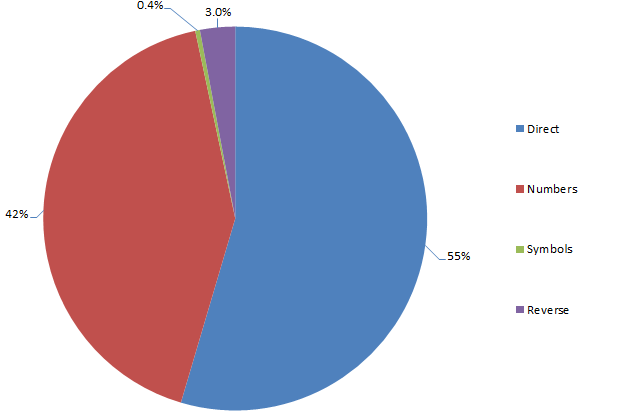
The graph above includes these three practices and the propensity of them within people names breaks down as follows:

Structure of passwords derived from people names
Structure of passwords derived from people names

Obviously numbers are the favourites and they’re almost exclusively appended to the name rather than prepended. Furthermore, the appended number is very, very frequently just a “1”. Two digit numbers, likely representing a year, also feature quite frequently (year of birth, perhaps?) as do four digit numbers which I assume would imply the same thing (certainly it’s feasible based on the number range).

Use of symbols is quite rare but then again, as I mentioned right at the start of this post, less than 1% of passwords in my previous analysis had a symbol anyway so no big surprises there. The reversed names are obviously an attempt to obfuscate the password and decrease discoverability. In reality, a reversed name is still the same number and type of characters so passwords such as “trebor”, “nevets” and “samoht” are still going to be very vulnerable to brute force attacks such as by rainbow table.

Place names

Another very common practice is to use the name of a place in the password. This might be a city, a state or a country and it’s probably fair to speculate that these places have some degree of personal significance to the password creator. Here’s how prevalent those place names are:

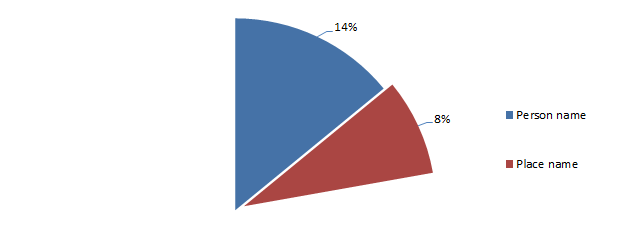
Passwords derived from a place name
Passwords derived from a place name

What we’re seeing here is that 8% of all passwords are based on a place name. The most popular place names included:

  1. dallas
  2. canada
  3. boston

The trick with place names is that very often they could also be people names (i.e. Victoria), which is not surprising given many places are named after people. Likewise, they’re very frequently dictionary names (i.e. Sunshine) and in both cases it’s simply impossible to make an assumption about what the individual was thinking when the password was created. Either way though, the central theme is still the same: the passwords are being derived from common words.

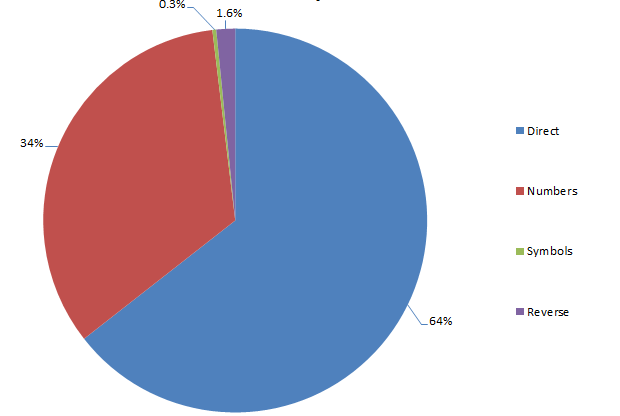
In terms of numbers, symbols and reversing tricks, it’s a pretty consistent result with what we saw previously with people names:

Structure of passwords derived from place names
Structure of passwords derived from place names

Once again, the old faithful “1” suffix is most popular. It’s as though people know they should mix character types but they take the easy way out instead of choosing truly random numbers and positioning them at unpredictable locations within the password.

Dictionary words

Here’s the big one, and it’s not at all surprising given the huge selection available. Dictionary words are by far and away the most popular source of password inspiration:

Passwords derived from a dictionary word
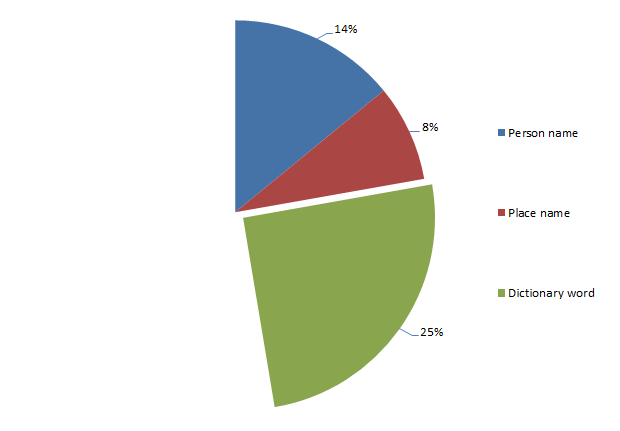
Passwords derived from a dictionary word

A huge 25% of passwords are derived directly from dictionary words. In reality, it’s probably somewhat higher than this as my dictionary had less than a couple of hundred thousand words. And they’re all only English language.

Top among the dictionary favourites are:

  1. password (oh dear)
  2. monkey
  3. dragon

The first one probably shouldn’t be such a surprise but still, wow! My password source of several hundred thousand accounts had nearly two and a half thousand “password” passwords which is not only a pretty poor choice given its clearly available in a dictionary, it’s also an insanely obvious one.

It’s a pretty similar story to people names and places when it comes to mixing up words with a bit of randomness:

Structure of passwords derived from dictionary words
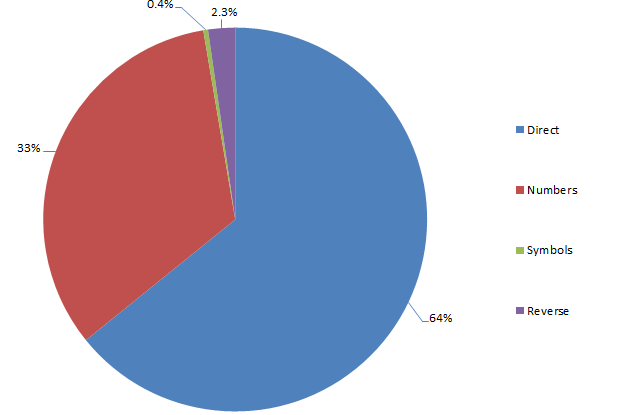
Structure of passwords derived from dictionary words

Same deal as before too – predominantly suffixes and predominantly predictable number patterns. I think we’re seeing a pattern here…

Numbers

Here’s another significant portion of passwords – numbers. I don’t mean numbers combined with words, I mean numbers and only numbers. In fact they feature rather significantly:

Passwords derived from numbers
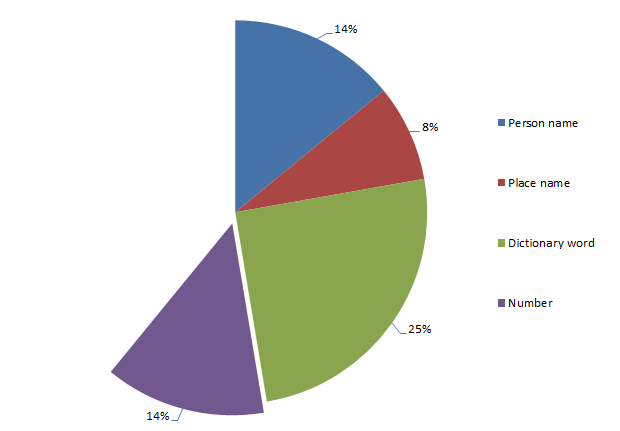
Passwords derived from numbers

A total of 14% of passwords are purely numeric. If that seems kind of staggeringly high to you, wait until you see the three most popular number combinations:

  1. 123456
  2. 12345678
  3. 123456789

I don’t think we need to do much speculating about how these were derived. What’s a little more interesting though is the spread of lengths:

Length of purely numeric passwords
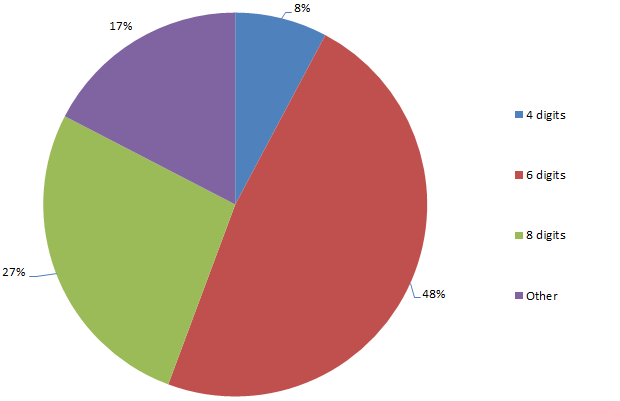
Length of purely numeric passwords

Why is this interesting? Well firstly, within a spread of numeric password lengths which range from 1 (yes, 1, and there’s a heap of ‘em) to 21, 83% of the passwords are either four, six or eight digits long. Is this a propensity for even numbered password lengths or something else?

For four digit passwords, the spread is pretty widely distributed in terms of number of occurrence, at least once you ignore “1234” (the most commonly used four digit password by a factor of ten). However, there’s quite a prevalence of numbers which could easily represent recent years (1984 is quite popular), so I suspect there’s often a date based significance. The other thing to consider is that given the propensity for password reuse and the fact that many PIN numbers are four digits, there’s a good chance these numbers are used on someone’s luggage or – gasp! – is the one they use to pull money from an ATM.

The thing about six digit numbers is that they very, very frequently represent dates in DDMMYY format (or MMDDYY for the Americans). The ranges of each three pairs of numbers in the password list suggest there’s a high likelihood that these passwords do indeed relate to dates, assumedly of some personal significance to the creator.

So what about the high prevalence of eight digit numbers? There’s some degree of numbers meeting a DDMMYYYYY format (or American equivalent), but for the most part, there’s no obvious pattern. Based on what we’ve seen so far there’s almost certainly a personal significance to the numbers but it’s not obvious from their format, at least not beyond those that adhere to obvious, memorable patterns such as “12345678” or “11223344”.

It might seem a bit liberal having a dedicated category for all passwords of one character type, but when you consider the extremely limited character set – ten as opposed to 95 (printable ASCII characters) – there’s obviously some very specific reasons for only choosing numbers.

Double words

We’re getting into the more abstract patterns here but one which does occur quite a bit is double words (i.e. “troytroy”):

Passwords comprised of double words
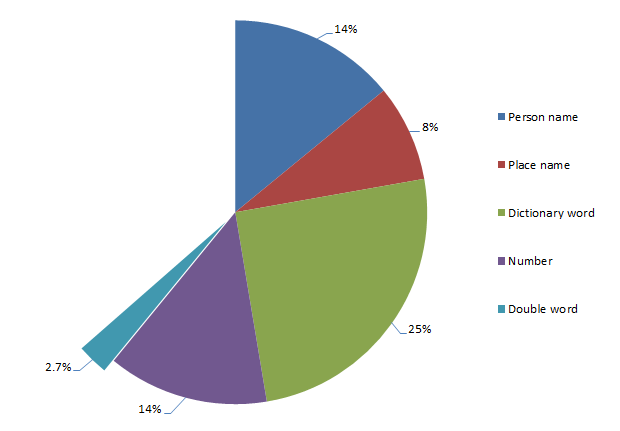
Passwords comprised of double words

Again, we’re talking small numbers now, and less than 3% hardly sets the world on fire, but there’s a clear pattern nonetheless. Here’s what’s popping up most frequently:

  1. blahblah
  2. poopoo
  3. lovelove

As well as repeating words, there are also patterns of doubling up on other random characters. We could speculate the thought process is that this practice is enabling simple passwords of very short length to be literally doubled in size, but of course in many cases, they’re still short (eight characters or less), lowercase alphanumeric strings which is a pretty basic pattern.

Passwords found within email addresses

This is a pretty brazen attempt at simplifying the whole logon process – why struggle to remember a password when you can simply use the identity component of the email address? Confused? It would be like me taking the “troyhunt” out of troyhunt@hotmail.com and using that as my password. There’s a bit of that going on here:

Passwords derived from the email address
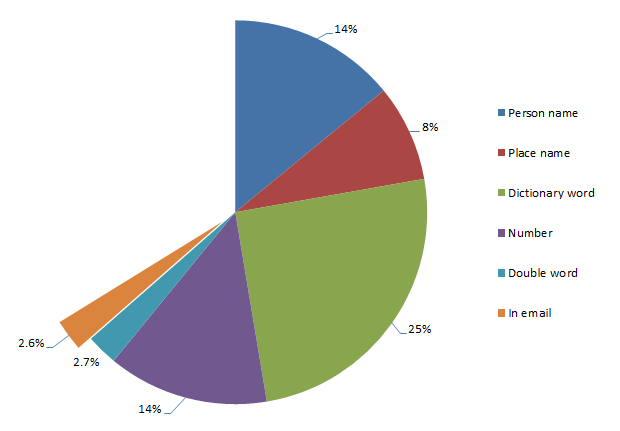
Passwords derived from the email address

Ok, less than 3% is a small number but again – wow! – people actually do this! Let me illustrate with the domain excluded so there’s some degree of privacy retained:

  1. Email: murphy666@… Password: murphy666
  2. Email: baolihua@… Password: baolihua
  3. Email: racecar73@… Password: racecar73

The inspiration for these passwords is pretty clear – no more speculation needed!

Short phrases

This one is a little tricky to quantify as the only way of identifying the phrases was to literally eyeball the data and build up a phrase list based of the most common occurrences. However, I thought it was worthwhile pursuing and whilst the numbers below are inevitably lower than the true number (I didn’t read through every password), I know from previous experience that short phrases are often – and incorrectly – thought to be a “secure” form of password. Here’s what I found:

Passwords that are short phrases
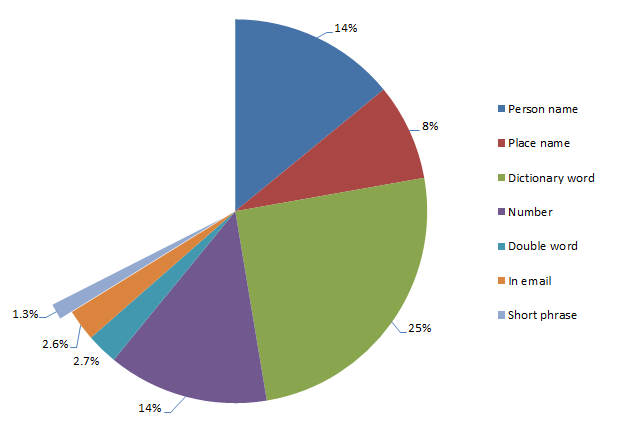
Passwords that are short phrases

What sort of phrases are we looking at? Here’s the most popular few:

  1. trustno1
  2. letmein
  3. iloveyou

The first one is a little amusing given the context and that it appeared as agent Fox Mulder’s password in the X-Files series (not a great password role model!) The others are obviously simple and easy to remember which is a pattern repeated throughout most of the remaining phrases. Yes, they add length and variety (at least in a dictionary sense), but once again, they’re short, predominantly alphabet-centric lowercase passwords. The other thing is that they’re frequently found in password dictionaries (note – not English dictionaries, rather lists of common passwords). In fact “letmein” and “iloveyou” can both be fund in the popular darkc0de.lst password dictionary.

Keyboard patterns

Whilst we’re now getting down into small numbers, keyboard patterns have long been advocated by some as a “secure” means of creating passwords. The theory is that they don’t appear in English language dictionaries (although they often do in password dictionaries), and they’re easy to remember as they’re pattern based. Here’s how they features in the data set:

Passwords that are keyboard patterns
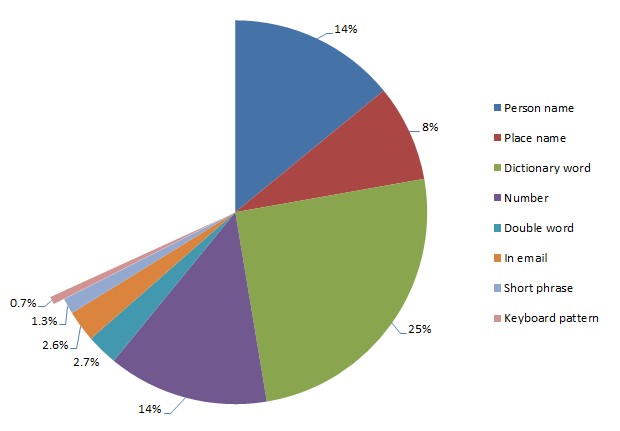
Passwords that are keyboard patterns

Again, this was based on me manually identifying patterns so inevitably I’ve missed a few but certainly I’ve caught a lot of the high frequency ones. Here’s the sort of patterns I’m regularly seeing:

  1. qwerty
  2. asdfgh
  3. asdf1234

Obviously in a case like the last example, they’re trying to mix things up a little but the pattern is still very clear:
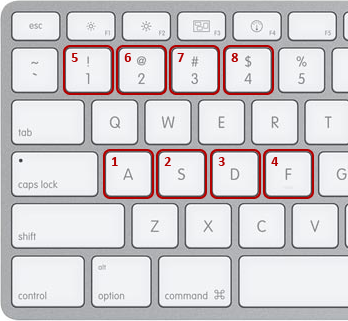
Keyboard pattern for password

Some of the more creative ones start to take different directions across the keyboard or add a bit of randomness to the recurrence of letters and numbers but the practice remains the same: predictable.

Related to the site

Whilst this is a very small result in terms of percentages, I thought it was a pattern worth commenting on as it’s quite a different approach to deriving a password. In this pattern, the password has a very direct link to the site in which it’s created, either based on name or other attributes relating to the nature of the site. Here’s how it breaks down:

Passwords related to the site they're created on
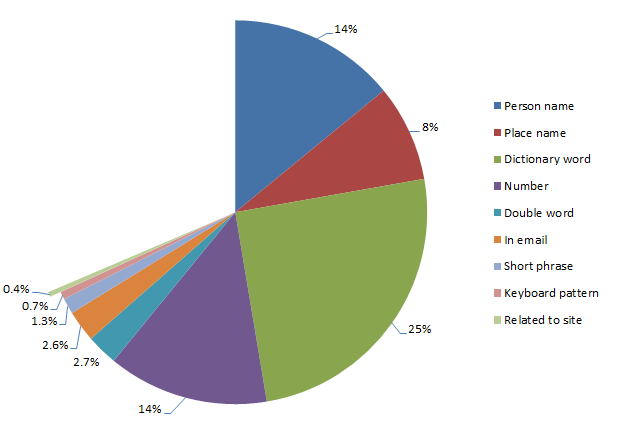
Passwords related to the site they're created on


Let me put this into context:

  1. Site: Gawker Password: Gawker
  2. Site: Sony Pictures Password: sony123
  3. Site: pron.com Password: ilovepron

So once again we have password that are easy to recall based on a memorable attribute. Of course this is also a rather obvious attribute (it’s staring you in the face when you go to logon), and on that basis alone, it really doesn’t form a very robust password. Incidentally, some of these are rather amusing, particularly the ones from pron.com :)

Everything else

So what does that leave? Well, a rather large number of passwords which don’t comply with recognisable patterns or they simply slipped through my filters (the latter is highly likely and there would be a significant number of passwords in this category). Here’s what’s left:

Passwords not derived from sources in the above analysis
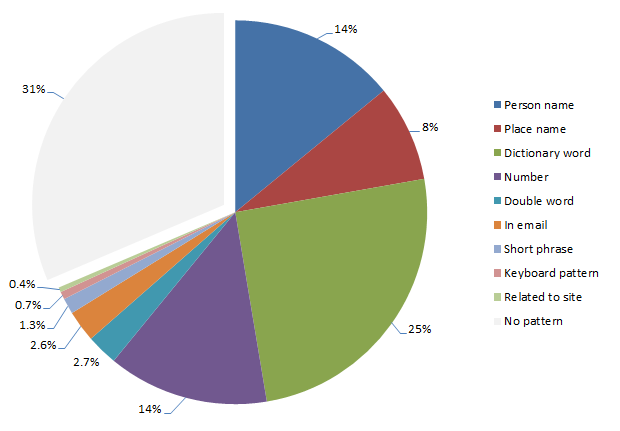
Passwords not derived from sources in the above analysis

High prevalence, typical examples include:

  1. thx1138 (turns out this is a movie from forty years back)
  2. gundam (actually an anime series)
  3. ncc1701 (codename for the USS Enterprise in Star Trek)

So there’s a whole range of passwords out there which whilst they won’t be picked up by any of the patterns discussed above, do in fact relate to popular culture. This is a fairly obvious source of inspiration although one that’s difficult to define in a set word list.

Then of course there are simply passwords which don’t adhere to any discoverable pattern, for example “mw818283” (although interestingly a Google search does show this up in an online password dictionary). The thing is though, these fall into the minority and even if they are “strong” (long, random, unique), they’re now commonly available in password dictionaries to be used in future brute force attacks. Because my entire password database has come from compromised sites which are now readily available online, the reality is that none of these passwords should be used again. Ever.

Summary

So what do we make of all this? There are some obvious conclusions:

  1. Passwords are inspired by words of personal significance or other memorable patterns.
  2. Attempts to obfuscate or strengthen passwords usually follow predictable patterns.
  3. Truly random passwords are all but non-existent – they’re less than 1% of the data set.

A significant part of the problem is clearly websites implementing very lax password policies (or none at all based on the one character instances), where at the very least, there should be a robust minimum criteria. How high should the bar be set? Well, that’s another topic of much debate and there are obvious usability implications. Then there’s the idea of taking password requirements to a whole new level and doing what Hotmail has just done by actively disallowing vulnerable passwords.

But the intention of this post was always to identify how people are presently choosing their passwords and we have good insight into that now. Of course the next question is “how should people be choosing passwords”? The answer to this is simple: The only secure password is the one you can’t remember.

145 comments:

Daniel Nolan said...

Great analysis Troy.

This might be a bit of a juvenile question, but did you see any patterns in the use of expletives/swear words in the passwords?

Once upon a time a colleague was asked to recite his password in one of our test systems (the password involved a part of the male anatomy). He was a bright shade of pink for the rest of the system demo!

troyhunt said...

Yeah, there were some pretty creative ones from pron.com. Maybe I need to do an X-rated password analysis post :)

Wim Van Nieuwenhoven said...

Would it be advisable to split the login process so the choice of a login/username is done seperately (in time) from the choice of a password?

troyhunt said...

Not particularly as other than the significant usability impact, user names are very frequently email addresses which are (mostly) static. Plus we also know that password reuse is rampant across different accounts created at different times so obviously many people are already stuck in their password-selection ways regardless of when they actually create the account.

Smolderse said...

I'm pretty glad to see that my commonly used password is one of the "no pattern" ones. Though, I suppose, I use it too much to still be a safe password...

FilterJoe said...

Thanks for another nice post, Troy. I think it's worth mentioning:

1) The patterns discovered from this type of password analysis are used to construct password cracking tools, such as described by Schneier, here:

http://www.schneier.com/blog/archives/2007/01/choosing_secure.html

I'm guessing tools like that have become more sophisticated in the 5 years since that was written.

2) Though you and I advocate a password manager approach (generating 15+ character random jumbles for passwords), users still must select a master password. Here are a couple good resources on how to do this, including my own which includes examples:

http://www.filterjoe.com/2010/05/14/wise-use-of-password-managers/

http://blog.agilebits.com/2011/06/toward-better-master-passwords/

More important than anything is length, but it's also wise to avoid any of the predictable patterns you describe above.

Sigh said...

"Turns out this is a movie from forty years back." Were you born and raised in a barn? You culturally illiterate brute.

agragr said...

" The only secure password is the one you can’t remember." Nonsense. Check out http://www.diceware.com for ways to make memorable, high entropy passwords. 

Myrddin Emrys said...

I have always advocated that someone type a short sentence. A touch typist, in particular, can quickly slam out a meaningful sentence as fast as a gibberish password, if not faster, and it's hard to brute force.

My cat sheds a lot.

Hark, a lark!

I'm not a fan of choosing passwords.

It's a rarely used tactic, it's extremely easy to remember, and it's difficult to brute force. It's not as good as a truly random password, and the entropy per character is very low... but it's still far beyond the typical alphanumeric password.

Benjamin Raush said...

A new password strategy I recently employed across any site / service that requires one is this:

Pick a master password (such as tgd4uh7sa324) something that has no meaning, and is completely random as far as you can tell. 

Then come up with some strategy for abbreviating the site logging into,
Ex:
Twitter = tw
Facebook = fb
blogger = bl
Just as long as you can consistently look at a site you are logging into and abbreviate it the same way every time.

Then find a way to add or mix that with your master password. so for facebook and the example password you could end with:
(tgd4uh7sa324 + fb)

tgd4uh7sa324fb
fbtgd4uh7sa324
tfgbd4uh7sa324
tgd4uh7sa3f2b4

And do this for every place you need a password, this is both secure and highly unpredictable, easily rememberable as you only need to memorize your master password and the strategy you came up with....

If you reproduce this in any way credit me: Benjamin Raush

Adam Fuller said...

I think I can tell you why 8 numbers is common...  8 is, in my experience, the most common cut-off length for passwords.

mrgreen said...

First of all, fantastic analysis, it was a good read.

Just to add my $0.02, it's always a challenge to get common users to use strong passwords.
I think everyone reading this already buys into and understands why we need strong passwords.
This is a difficult thing to get users to conform to.

But a good trick to teach users is to transpose on the keyboard.
Get them to type each letter to the above right of each letter in the word.
For example, looks at the word 'sunshine' now type the key to the above right for each letter in sunshine.
This would turn sunshine into e8jeu9j4.
jennifer would become i4jj9t45
skeleton would become eo4p460j

This of course wouldn't world for qwerty which would become 234567.

But at least this way the user only has to remember a word while the password stored is actually strong.
I don't use this technique myself, but it makes strong password requirements an easier sell to stubborn users.

drkennethnoisewater said...

Don't forget to use symbols if/where you can!  I have a few passwords that are >12 chars and have caps, numbers, and symbols in them that are consigned to muscle memory at this point..

Idan Shoham said...

This is a really cool analysis - I don't think it's been done on a data set this rich before.  :-)

Regarding using passphrases instead of passwords - I did a rough analysis of how secure that is (or rather, probably isn't):

http://blogs.hitachi-id.com/blogs/idan/2009/06/30/pass-phrases-the-illusion-of-security/

-- Idan
   http://hitachi-id.com/

Roger Black said...

This is a truly bad idea for a couple of reasons.
If someone is using a different keyboard map than you expect, this will break, and they can't login.
(also the case for some laptop keyboards).

Secondly - you take a password dictionary, and you simply translate a-z, q-w, r-t, .... and three or seven other transforms, and there you are with all words and all simple 'one-over' maps in it.

Snorre Milde said...

1) The pie charts that represent a subset of the previous pie chart should conform to the same 100% total. At no point should you as a reader be confused about how many percentage of the total we are talking about. There is no real exception here that I can think of. Once you start using pie charts in a story, it should be implicit that we are operating on the same scale. That is their purpose.2) Did your dictionary lists contain other languages than English? Ifnot, and your data set contained non-English speaking users, I have afeeling that your results for dictionary words would be even higher.

Caluca said...

I would instead choose the beginning letter of each word of the sentence and make it a long one and slap a number and alpha at the end...VOILA

"Lets See if You can Hack Mother F 8540*!"

LSiYcHMF8540*!  <good luck with this :).

Snorre Milde said...

(Sorry about the lack of formatting here. The comment was copied from my iPad, since I could not post the comment from my tablet. I hope it still is readable to some degree.)

Troy Hunt said...

I'm aware of Diceware but unless you're a Rain Man style savant, it's fundamentally flawed ("incomplete" is probably fairer), in that all it does for you is generates pass-phrases. Your problem now is that you need to remember which phrases belong to which sites which is fine for a small handful but get up to 10, 30, 50 and you've got a problem. Plus you're also assuming that each site you create a password for will actually allow both the length and character range (even just letters) generated by the dice rolls and there are many which won't: http://www.troyhunt.com/2011/01/whos-who-of-bad-password-practices.html

Troy Hunt said...

That's fine, but as I just said in an earlier comment, how are you going to remember which unique phrase belongs to which account across the whole gamut of your online identities without resorting to password reuse?

nop said...

and if any of your passwords are cracked or otherwise exposed all your passwords are trivial to figure out...

Troy Hunt said...

I've seen this proposed many times before (the same suggestion has been made on some of my other posts), but there are several problems prohibiting you from applying this approach consistently:

1) When you need to need to change your password for a site you're forced to break the pattern.
2) If you have multiple accounts for a site (i.e. business and personal Twitter accounts), then at least one of them needs to break the pattern or it needs to be adapted.
3) There are many sites which simply won't allow you to use the character range - and sometimes length - that this method generates: http://www.troyhunt.com/2011/01/whos-who-of-bad-password-practices.html

So in short, you're going to end up with exceptions which need to be managed. The other thing that worries me is that simple pattern-based processes for password creation are extremely vulnerable if two or more of your accounts are exposed. If I had, say, your Gawker password and your Sony password and they both followed the pattern above, I'd own every single one of your accounts you applied the same approach to.

Troy Hunt said...

...and you still need to remember which password belongs to which site.

UnknownGuest said...

little known tip: consonants+vowels=words. make up words, throw in numbers and you have yourself one mighty tough-to-guess but easy-to-remember password.

Troy Hunt said...

Thanks Snorre, clearly visual representation of data is something I need to work more on :)

In answer to your question, I did make several references to it being an English only dictionary and I totally agree with your suggestion that the consequent proportion of dictionary words is WAY too low.

Paai said...

My favorite strategy for passwords that is difficult to guess but easy to remember is the first characters of the words of a sentence. Preferably in german, because of the capitals, and with some number added.

What would be the drawbacks of this strategy?

Paai

Troy Hunt said...

Simple - how will you remember which password belongs to which site? And how will you handle sites which don't allow letters in the password?

Jeremy Stone said...

Fantastic analysis!  I think more like this needs to be done.  I really like your breakdown and your summary.

As a programmer, I think part of the problem with passwords is the question we are asking the user.  When I hit a website that requires me to have a number, uppercase and 10+ character password I will very much follow the patterns.  As a user I will choose a password I can remember.  Adding "requirements" doesn't help anyone, I will either write down my password (which can be stolen more easily especially if it's stored electronically) or I will follow a very simple pattern that I can remember (i.e. first letter caps, append a 1 at the end).  The way to make passwords more secure is not to require the user to remember ultra-complex passwords, it is to ask questions which only the user has the answer, and can easily identify.

Unfortunately I have a lot of ideas here but no real good way to test the ideas out.  I wish someone would take a good hard look at the question we are asking -- "What's your password?" and refine the question to get a better set of answers.

thiet ke logo said...

Wow! they looked very interesting and very good.Thank post

Troy Hunt said...

I look at the problem from two discrete angles Jeremy: Firstly, I'm an end user just like everyone else and usability is important to me. Protection of my online identities is also very important to me and consequently I know that the only way to achieve both is to use a password manager.

Secondly, like you, I'm a programmer and I know all too well how simple passwords can fall to brute force attacks (have a look at a recent post where I've used a rainbow table to break a hashed password set: http://www.troyhunt.com/2011/06/owasp-top-10-for-net-developers-part-7.html). I also know that the likelihood of this happening is dramatically reduced with the introduction of length and character variety and that forcing this minimum requirement provides additional protection for both my employer and their customers should the worst case scenario come true (database is exposed).

Unfortunately passwords are just the best mousetrap we have for the moment.

Guest said...

That strategy isn't exactly unique to you, but it does work pretty well for both memory and casual attacks.  Chances are good, though, that an actual human who finds your password and analyzes it closely will be able to spot that pattern.  "It came from facebook and there's a fb in it, let's go to Bank of America and try his username with boa instead of fb in the password".

marcoskirsch said...

Ok ok, I got it about reuse. Reuse is bad. What do you advice we do? We can't write passwords down because they may get stolen. We can't reuse because if one place gets hacked we are screwed. We can't create good passwords for each site because we won't remember them.

1password? What do you advice?

Troy Hunt said...

Bingo. Either 1Password or one of its peers: http://www.troyhunt.com/2011/03/only-secure-password-is-one-you-cant.html

Guest said...

Here's one.  How many people actually care about their Gawker password?  I use one (admittedly strong) password for all my "I don't care" websites.  If it doesn't handle my financial information, I can't be bothered to come up with a shiny new password for it.  If it's a truly shady looking place or I'm really not coming back, I just throw some BS like "temp" at it.

Todd VerBeek said...

"And how will you handle sites which don't allow letters in the password?"

Cancel registration and never visit them again?

Troy Hunt said...

So you'd change banks? Stop flying on particular airlines (or at least accruing frequent flyer points with them)? Refinance your home loan with someone else? I love your passion for wanting to create strong passwords, but I'm not sure I'd go that far.

Unfortunately these practices are just too endemic to simply ignore sites that employ them: http://www.troyhunt.com/2011/01/whos-who-of-bad-password-practices.html

Luke said...

I like the shortphrase/mnemonic converted to acronym, then l33ted.
Why does Troy Hunt make me sign in? -> Wdthmmsi?  ->  WdTHmm51?

xQx said...

Very interesting post, but I don't understand how you came to the conclusion that "Truly random passwords are all but non-existent – they’re less than 1% of the data set." when 31% of your sample sits in the 'No pattern' segment?

What is your definition of 'truly random' if it is not 'no pattern'? 

(eg. "the" has a 1 in 18,000 chance of being generated by a truly random generator of three-letter passwords - it is only us who see the significance of that 'truly random' password)

DVDBob said...

While true that it would be difficult to remember a large number of passwords for a large number of sites, what I like to do is only have 4 or 5 passwords in total and reuse them based on a category.  Less risky sites like "Social" get relatively weak passwords because frankly I don't care if someone wants to get into my Facebook and plant a few rows of corn.  "Banks/CCs/Investments" get, what I hope is, a relatively secure password. (15+ characters, usually a phrase, with a mix of special symbols, case and numbers. For example - tH1sisn0tmYpa$$wo4d)  "Email," "Shopping," "Work" and "Pron" get something in between, based on risk of what data is stored.  For those sites that don't allow length and special characters, they still typically allow mixed case and so will use as much of the phrase that I can.  As far as remembering which sites play by the rules and which don't, the site will do that for me...I attempt my primary password once, if I get denied I try a typical alternate, denied again, I consult with my "post-it-notes" (digital and paper backup!).  Now before you say that's a bad idea, you should know that my "notes" are only for those sites that don't allow one of my 4 or 5 passwords only lists the site, the number of characters allowed + a factor that I know (if it allows 7, I may write down 9), and a Y or N for numbers, then symbols.  

To make things just a bit more secure, I'll increment the first number in my passwords every 90 days.  (I let my company's timer keep me on schedule)

DVDBob said...

Uhh, last time I checked, 2011-1971 = 40.

Gozelenka said...

The thing I find most annoying is that I know my Bank password is my weakest password, as it only allows a maximum of 6 characters, and forces me to use an on-screen keyboard as it's 'more secure'!

Troy Hunt said...

I could have been clearer about this - what I meant to say was that 31% of passwords didn't fit any of the patterns I investigated (i.e. dictionary words, places, email addresses). In concluding that truly random passwords were near non-existent, I was referring to the infrequent use of symbols which would make an appearance in a significant portion of the dataset if each character had been randomised from the printable ASCII character set.

Youcanthavemyemail said...

Personally, I like one of two ideas for users who can't remember
multiple secure passwords. First, and easiest, is to have a 'seed' that
is easy to remember, and you don't write it down ANYWHERE. (It can be as
simple as 1234abcd for this example.) Second, you have a list of random
numbers and the corresponding site. (Presumably you don't have to write
down your own usernames, am I right?) Now, increment the digits of your
seed by the numbers in the same position in the random string on your
list for a given site.


Example:


Your seed is 1234abcd.

Your Hotmail string is 56781234.

Your Hotmail password is, thus, 681012bdgh.


The other involves a similar process, and is somewhat less secure. You
have the same type of list, but rather than a seed, you get your
password by adding non-relevant strings together, using a pattern (that
you don't write down!) to know what goes where.


Example:


Your pattern is to use the strings above and below. (If there is no
above or below, use the first on the list for below, or last for above.) Your list looks like this:


Hotmail 12345

Gmail 67890

Yahoo 01925


Your actual passwords look like this:


Hotmail 6817115 (6+0, 7+1, 8+9, 9+2, 0+5)

Gmail 1312610 (1+0, 2+1, 3+9, 4+2, 5+5)

Yahoo 7911135 (1+6, 2+7, 3+8, 4+9, 5+0)


Of course, the actual list would have numbers AND letters in it. Adding
letters and numbers is easy, adding letter to letters takes some
counting.


No, I do not use either of these techniques personally, as I don't keep lists of passwords. But I've considered it, and feel it to be safe (so long as you remember your pattern or seed and don't share it with anyone, and hopefully you use a different pattern than the oh-so-obvious example pattern) and convenient, at least for home use. (Mobile users may feel differently.)

Troy Hunt said...

Preaching to the converted! http://www.troyhunt.com/2011/01/whos-who-of-bad-password-practices.html

Alan said...

My method is usually to pick two word at random. Even if each word is easily found in a dictionary, the search space goes up from say, 10,000 words to 100 million. And I just write them all down in a text file on my computer. If my computer is hacked, I'm screwed, but that's pretty much the case no matter what, they can just keylog you. 

Not perfect, but I think I'm not low hanging fruit.

Guest said...

Because people who are clever can use this to discover other information about you, like your email, which they can then use to find out other passwords. Many people have done online banking and that needs an email...there you go, from Gawker to your bank account in just a short time.

People stealing your password aren't stupid, but the people they take them from are.

Devon said...

Wow. Just, wow.

Leonardtj said...

I personally group sites in to one of three categories junk semi (gawker, and other forums) secure (sites that relate to my online Identity) and secure(bank, email, twitter, facebook and other sites directly part of my online identity).  for the junk sites I use (and reuse a 9 character password like 75r06g13h (not my real one but similar pattern). for semi secure I beef it up to a diction are word with some punctuation in it like &cred^enz@ .  for my secure ones I use a dictionary work with punctuation and numbers like 9!Pep5per&onI*5. I never use numbers that mean anything to me, and always just pick a random word from the dictionary. I do also use a password manager mainly for the auto insert feature. I think my system is pretty good since I also change them when the time changes due to daylight savings.   but I would love to know what you think

Troy Hunt said...

Pure curiosity question: what's a specific example of one of the sites where you don't care about someone impersonating you?

Dean said...

Just changed my 13 character online banking password thanks to this...
and that was non-dictionary mixed lower / upper with numbers too!

NoWayJay said...

I'm surprised that you left out "Taking a word and removing the vowels".

Lee_Mc said...

The problem of making and using good passwords is essentially a time problem.

You need to make a bunch of passwords before you need them. You need to get your hands on your list of passwords each time you need a new password. You need that same list when you log on to existing sites.

But the itching realization is there are still lots of security holes that I can't plug. One of the things that bothers me is the possibility of a JavaScript hack where the script is not killed when you close the browser session.

Here is the command line I use in Linux to generate a bunch of passwords.
/usr/bin/apg -a 1 -n 99 -m 11 -x 13 -M CL; /usr/bin/apg -a 1 -n 100 -m 17 -x 23 -M NCL  ;/usr/bin/apg -a 1 -n 99 -m 11 -x 13 -M nCLS -E \!\$\'\"\;\:\` ; /usr/bin/apg -a 1 -n 100 -m 17 -x 23 -M NCLS -E \!\$\'\"\;\:\` ) | cat -n

Hint, even easier than the Keepasssafe program, the vi editor has an X feature that does automatic encrypted file reading and writing. If you are familiar with vi, super safe password storage is readily available.

Troy Hunt said...

Time isn't a factor with password managers like 1Password - just hit the "Generate" button and you'll get a string matching your predefined entropy criteria.

Eric said...

Maybe it is just me, but on a site like gawker, sony or pron I would not care in the least about security and would use some generic password, like 'password', for a site that should not really need a login at all.  Only a few sites, like banks, warrant the effort of creating and remembering a real password.  Purely speculation, but I would hope a bank leak would provide a more meaningful data set.

Glynn Gates said...

I don't think he was complaining about his math.

He was slagging him for never have had previously know the movie THX1138 which was George Lucas' first movie as any good sci fi guy should know.

Andrew said...

I think Sigh was suggesting that it's hard to believe there are people who haven't heard of George Lucas and his work.

Fake Name said...

I'm similar to Walter, though not quite "password" level, all sites I don't care about get (or got - now that some sites have password rules I have a few variants) the same password.  Examples include Battle.net, newspapers, slashdot, ESPN, Hulu,  etc., basically anywhere that doesn't have financial info or that serves a professional purpose.  More secure sites are things like Amazon, email, banking, and work.  

Chris Lineker said...

He also refered to ncc1701 as the enterprises 'codename'

Clearly he has never watched SciFi in his life.

Fake Name said...

Forgot to mention that I suspect the frequency of 6 and 8 character passwords has to do with lots of sites that require passwords of that length or longer.  Conversely, a lot of the lack of non-alphanumeric passwords is that many (older) password rules forbade these.  While from a strict security standpoint password reuse is bad, Repeating moderately strong passwords for sites that are noncritical is probably better than having a txt file on your desktop listing all of your passwords, even the important ones because you can't keep track of which one is which.

Troy Hunt said...

Guilty as charged guys, not generally a sci fi fan. I suspect I'm also not a fan of many of the other genres of pop culture so there's probably plenty I've missed.

Francis Turner said...

I will note that I frequently use password as my password. But I use it on sites where I give no personal information other than email address (and/or name) and where I really don't care if someone wants to try and pretend to be me.

Troy Hunt said...

Would you be prepared to share what those sites are?

Francis Turner said...

Sure. Newspaper sites for example. Also online forums that I want to ask a question in once and will never go back. Tech support sites for products where I want to complain but need to be registered to do so.

Some of those don't allow me to do basic password but they nearly always allow the L33t version (PA55word)

For the sites that I care about I use a system similar to this - http://blog.jgc.org/2010/12/write-your-passwords-down.html

Troy Hunt said...

What I mean is would you be prepared to share the specific sites - name and URL - where you don't care about your account and your password is "password"?

Nick said...

This is one site where I don't care who impersonates me.  :)

Francis Turner said...

Sure - www.thelancet.com is a good example that I appear to have remembered the password password for. A lot of them I never log into again so I don't get my browser to remember the password. Come to think of it I may have an identiry on disqus too with a password password, but I don't recall the username for it...

Samudra said...

There is a technique I use which may be both useful and secure. First, I use a password generator to generator a new random password for every site I need a password for. These passwords I store in an encrypted vault which is backed up regularly. Now, the obvious question is about remembering the passwords. What I have seen is that I use a few sites more frequently than others and after using the passwords for those sites a few time I remember those. For those sites, I go infrequently, I open the vault and look up my password. So, my memory acts as a sliding cache ! The more frequently I use a site the more I remember. If I start using a site less, the password expires from my memory cache and then if I have to use it again I have to refresh my memory cache from persistent storage. 

Dieter Lange said...

"The only secure password is the one you can’t remember.": this prevents your login, not those from others ;-)

Someguy said...

One of the banks or credit cards (CIBC I think) actually demanded I create a password that was numeric only and must be between 6 and 8 characters. They are pretty much asking for a phone number.That was just a few years ago and they still may have that policy. I changed banks.

Firsthundred100 said...

What a nasty response to an offhand comment! 


Culture is a matter of priorities. Nobody has time to be culturally literate in all areas that other people might deem important. I, for one, have a pretty lousy appreciation of opera. I'm not too hot on 16th Century Flemish painting either.

Have you read The Brothers Karamazov from start to finish? Thought not.

Troy Hunt said...

I hear you and have complained bitterly about it in the past: http://www.troyhunt.com/2011/01/whos-who-of-bad-password-practices.html

Guest said...

I think you can find more of the "uncommon" passwords by defining what it look like a typical user of the service you are taking the data from.
In this case most of the data come from an hardcore gamers network and some tech-savy websites like lifehacker and gizmodo.
You can guess that these people also like sci-fi, anime series and so on...

I would like to see what are the most used passwords in the "uncommon" percentage of a cooking website.

K. said...

People should choose passwords like this:
http://blown-to-bits.blogspot.com/2011/05/passwords-part-two-of-two.html

Peter Bindels said...

That's not entirely the point. If you analyse 3-letter passwords, "the" is going to be much more prevalent, slightly decreasing the odds of all the others. It can still be randomly generated, it's just much more likely to be picked by somebody.

K. said...

You are making a serious evaluation mistake: You assume that a human brain will look at the passwords, and figure out the function. Which will never be the case, when a hacker can instead just go with the other tens of thousands of accounts which use '12345' or 'iloveu' instead. Nobody will bother to break it, and if someone really wants to get at me, specifically, social engineering will be easier still.

Also: Can you really tell easily what the function is?

fpra0cnt -> facebook
gpra0wnt -> gawker

It's not actually trivial, and impossible with only one password. You'd need two to three at least.Breaking the pattern due to stupid restrictions is an issue, though. For that reason, I would suggest having two numbers and the rest letters, and use a function to end up with a length of 9-12.

Vladimir Jirasek said...

Very nice article Troy, thank you!

I personally use 1password to generate random password and save them, so I do not have to remember. But how many people would do this? If we still want have passwords to authenticate the browser needs to take some responsibility here. The website could indicate to the browser that the use is requested to generate new password and the browser simply generate one and save it in the password manager. 
This is a tactical solution. 

More strategic is to get away from passwords completely. In the age where we have all technologies such as PKI, mobile wallet, OpenID, OAuth, NFC, Bluetooth etc, your mobile phone can play bigger role here. It could store your digital identity and personas and securely authenticate you to the websites. 

I will be talking about it today during the ISC2 online conference. https://isc2.brighttalk.com/

Andy Canfield said...

I put a special character in the middle, such as "leo-nard". Troy says nothing about this type of breakup. On rare occasions I'll run into a site which won't take it.

I use insecure passwords for unimportant locations like e-mail, and highly secure passwords for critical sites like my bank account. Troy's analysis does not adjust for the security context.

Troy Hunt said...

That type of breakup is collected within the "no pattern" result set as it doesn't comply to any of the patterns I tested.

The relative security with which someone views a particular website is impossible to tell from a raw username and password data and will always be subjective. Having said that, I think you'll be hard pressed to find many people agreeing that email is unimportant given it is frequently the key to many of your online identities via password reset features.

Troy Hunt said...

Thanks very much for your comment Vladimir, it's great having this feedback from someone specialising in security. You've obviously got a lot of good insight into where the mobile landscape is heading, if your talk is recorded, transcribed or there are other artefacts available afterwards, I'd love to see it.

Yuri said...

I like (some) sci fi and I've never heard of THX1138.

harkyman said...

Good, memorable algorithm. First, settle on some consistent form of l33t speak to use for character/number substitutions. Then, for an important password come up with some meaningful phrase (if you're a physicist, choose something like "give me a place to stand, and I will move the world"). Finally, take the acronym of the phrase and perform you l33t transformation:

9maptsa1wmtw

Easily memorable, looks like complete gibberish.

To make it better, on each site you use it for, append the site's domain name to the end in acronym form. Obviously, you want a completely separate one for your banking site, and probably your Google/Gmail login as well.

Guest said...

A minor point, but did you consider the overlap between categories? There may be a non-trivial overlap between people and place.

Troy Hunt said...

Yes, and I did acknowledge that a couple of times (I know it's a lengthy post). I started with more personal attributes such as name then moved on to places, dictionaries, etc. and excluded positive matches from subsequent analysis. "Victoria", for example, was a hit against name then excluded in the place analysis.

Etherealmind said...

I wonder why so commenters on this post don't show any personal information. Don't they stand behind what they say ? Are they afraid of being public ? 

I find security experts have a highly developed sense if paranoia that isn't well founded. Is this proof positive ? 

Guest said...

Sorry, I should have read a little more carefully.

Garciafan said...

Another catagory I'd like to see analyzed is sports teams.  I bet you get a large number of sports references in passwords.  In England, I'm sure there are plenty of passwords based on varients of manu or Arsenal etc.  In the US, you will have plenty based on Bears, Giants etc.

Martin Sundhaug said...

THX-1138 is often used in the starwars universe as a reference to a previous move by the very same George Lucas

Jeff Cutsinger said...

Have you considered that e-mail is more important than you think? It is, after all, how most websites (possibly even your bank) allow you to reset your passwords.

Auke said...

"the reality is that none of these passwords should be used again. Ever."

That, sir, is wrong. If I would release a database of /all/ passwords except for "atidogcr028*762", and told everyone not to use any of my published passwords, then I would have no trouble getting access to the accounts of everyone who listened to me. Ideally, all possible passwords are used with equal probability (relative frequency), and that includes currently disclosed lists.

Maury said...

So the problem I have with managers, which generally seem like a good idea, is that I have more than one web device. I'm typing this on my iPhone, and I have a laptop and desktop.

Wait, you say, password manager XXX syncs passwords! Great, so what do I do when I'm at the dialup internet cafe in a small town in Peru?

My favorite problem is what I'm supposed to do when some brain dead site asks me to change my password on a schedule, and requires the existing password to be typed in first - and it's not a password field.

Does 1Password solve this? I've heard good things.

Anonymous said...

Is there any security issues with having your browser remember passwords? Not even sure why but I never liked the idea of having them saved Anywhere, even my own computer. My screen saver goes on very frequently and I need a password to get back on once that happens, so I'm not really worried about some friend of coworker or theif physically getting onto my computer.

Also I just realized one of my more secure passwords is to log on to my work computer, purely bc its easy to remember, being the address...112W23rdSt..for example

Merlyn said...

I use 1password, but what happens when someone compromises my 1password database?

The only thing I can think of is to run it on a system that has no external connections, and just type it into the system online....

But then you run the risk of someone compromising your online system and just recording your passwords as you type them.

I'm about ready to just give up on them entirely.

Andrew Riemer said...

Troy, the problem some people fail to see with the "sites I don't care about" argument is that if they are tied to the user's preferred email address (versus a throw-away address), then posts made under a compromised account can (and likely will) affect the reputation of that user's online persona.  Since many employers will run an Internet search on an applicant's name and/or email address, I work hard to use complex passwords (rememberable, however, through a personal algorithm) even on the sites /I/ don't care about.

Andrew Riemer said...

The concept of all possible passwords being used with equal probability could only come to fruition in an environment where all passwords are automatically generated and assigned.  Leaving the task to the human mind automatically means were going to see some passwords used more than others.

Andrew Riemer said...

One of my favorites (that freaked my friends out because of its length) was:

"We must away ere break of day / To seek the pale enchanted gold."

Ben Timby said...

Troy, great analysis, the results are pretty much what I expected (unfortunately).

I could not help thinking while reading this that it would be useful to try to retrain people to create secure passwords. Specifically, what are your thoughts on creating an online tool for such a task. Let me outline it below...

password-recipe.com
1. User selects a recipe.
2. Recipe walks user through password creation process that results in a secure password they can remember (or at least regenerate).

Example Recipe.
1. Think of two of your favorite movies. Now enter two character names from these movies.

input1: JarJar
input2: Banksie

Resulting password:
The length of your first input is 6, the length of the second input is 7, therefore, we will use the symbols corresponding to 6 & 7 on the keyboard as input 3: "^&". Interleaving the three inputs yields the following 8 character password:

JB^aa&rn

If you have trouble remembering this password, simply follow through this recipe again, remember the movie characters you selected and the same password will be generated. Optionally you can store this password into your online password wallet for safekeeping.

agragr said...

Diceware only tries to solve one problem, making strong passphrases that people can remember. Other problems, such as having too many passwords to remember or sites that won't allow strong passphrases, require different solutions. A triage approach, like DVDBob suggests cuts down on the number of high value passwords, but most of us have too many of those. I recommend writing passwords down and keeping them in a safe place or using a password manager program. The latter still requires a high entropy master password or phrase since it is used to form the encryption key that protects your password list (hence diceware). As for sites that do idiotic password management (your list is excellent), take your business elsewhere.

Duren said...

Interesting. I'm an amateur medieval researcher (read - I dress in funny clothes on weekends).  I have found dark ages/medieval words and/or names to be good 'cores' to passwords.

Ever *seen* old Norse? or old Saxon? or the spelling for some words/names in medieval gaelic or Celtic?

No, they are not truly random.  But they *are* pretty obscure (and easy for ME to remember).

ZekWoo said...

that actually does make a LOT of sense when you think about it. Wow.

bob said...

I have been living in China for the last 6 years and have noticed an appalling password system in use here. Chinese language and a short name list often results in common names being very common. So peoples user names are often realname+dob. The password usually copies form the bank system or telephone. It is very common to see people type 4 or 6 digit number only passwords.

Recently I signed up, and then cancelled, an account on Weibo. This is China's version of Twitter. The site insisted I use a password of only lowercase letters or numbers and no longer than 6 digits. Yes, not a minimum of 6 but a maximum of 6. It's like they want the site to be hacked.

Francis Turner said...

http://blog.jgc.org/2011/07/choosing-bad-password.html seems somewhat relevant...

DaCheese said...

I think this sort of thing explains the mystery of the 8-digit passwords. A lot of sites set 8 characters as either the minimum or maximum(?!) for passwords, so a lot of people who like to reuse passwords settle on an 8-character one for simplicity.

Troy Hunt said...

In defence of the commenters, I think there are very few who would classify themselves as security experts. There are a couple of people who have commented that are genuine experts and they've signed in with their real profiles, i.e. http://www.troyhunt.com/2011/07/science-of-password-selection.html#comment-256966974

Iknowyourpassword said...

 Amazing article!

David Burrow said...

A large part, I think, of the problem resulting in so many straight-alpha passwords is that many, many services arbitrarily restrict the characters available for use in passwords.  Just for work, I have one login that does not allow symbols in passwords, one that allows any combination of any keyboard characters, one that allows any character but must begin with a letter, one that allows no symbols and must begin with a letter, and several that restrict specific symbols (often slashes, colons and periods).

I cannot think of any valid reason for restricting allowable characters in a time where hashing functions are able to cope with any characters and all the major languages of which I'm aware are able to sanitize input such that any character can be accepted and passed to for further processing.

Even when I'm not using the same password for multiple accounts, it's strongly tempting to make the passwords on different accounts similar enough that I'm essentially only remembering variations on the same base, but to do that a use eventually has to produce passwords for the least-common denominator.

David said...

Two sources of reasonably good passwords: 

1.  A catch phrase consisting of one or more complete sentences including spaces and punctuation.  The sentences should be literate, which makes them longer than Tweets. 

2.  View someone's public OpenPGP or X.509 key in ASCII mode.  Take 6-10 characters from within the key. 

The real problem is securely documenting your passwords.  If you die, can your spouse get at your bank account numbers and your recent tax returns, both of which you have encrypted?  I have documented my passwords, placed the paper in a sealed envelope, and placed the envelope in a bank's safe deposit box.  My wife has a key and authorization to open the safe deposit box. 

ElijahGregory said...

I usually just imagine my account's been hijacked and see if I would be bothered or not. 

Anthony said...

Really useful analysis. I feel a bit better about my password choices now! Whew! Great work.

chao-mu said...

Wow. These comments are full of great jtr mangling rule tips disguised as password advice. Brilliant!

chao-mu said...

Also, thank you for the analysis. This blog just became a favorite :-)

Andy Canfield said...

One of the first things you ever memorize, and one that you will remember for the rest of your life, is your phone number when you're a kid. And yet that is virtually impossible to trace to you, since people have moved and the phone comany records have been lost.

Oh, but is it all digits? Not if you're old enough!

chao-mu said...

Also, thank you for the analysis. This blog just became a favorite :-)

Maury said...

So the problem I have with managers, which generally seem like a good idea, is that I have more than one web device. I'm typing this on my iPhone, and I have a laptop and desktop.

Wait, you say, password manager XXX syncs passwords! Great, so what do I do when I'm at the dialup internet cafe in a small town in Peru?

My favorite problem is what I'm supposed to do when some brain dead site asks me to change my password on a schedule, and requires the existing password to be typed in first - and it's not a password field.

Does 1Password solve this? I've heard good things.

Troy Hunt said...

I'm often in a situation where I have to login to a device which is not running a password manager. My Apple TV is the example that comes up most recently lately (damn thing just refuses to remember passwords for renting movies). What I do in these cases is have a shorter password comprising of unambiguous characters I can easily enter. It's still a satisfactory length and randomness to keep me happy but it's nowhere near the strength of, say, my PayPal account. I always have my iPhone / iPad close by so I just pull up the 1Password app on one of those, look up the iTunes password and type it in.

I'm not sure that the 1Password solution "solves" this scenario (whilst we're bound to passwords there's always going to be a level of inconvenience), but it certainly makes strong, unique passwords practical across all devices.

Troy Hunt said...

There are two angles to look at with the browser remembering passwords. Firstly, is the persistent storage mechanism at risk of disclosure, for example by malicious scripting or by direct access to the file system. I believe most of the major browsers now do a pretty good job of securing remembered passwords but am happy to be proved wrong on this.

The other angle is what you eluded to in that it opens a window of opportunity for someone to access your accounts of they have the ability to sit in front of your PC (or control it via other subversive methods). We're then into the realm of practices like password protected screen savers which kick in early and locking your PC when you walk away. These are solved by password managers like 1Password which require a master password before authenticating on your behalf.

Muskie the Otterboi said...

it's china. the government want to easily bruteforce the password in case you say something bad about them so they can send you to a re-education camp. 

Muskie the Otterboi said...

This is why I like things such as 2step authentication and OTPs. I bought an authenticator for my Battle.Net account the day they came out, and the system has never let me down. Until we get stuff like portable biometric scanners ( and even then I would want them in conjunction with other authentication methods), 2step seems to be the way to go. username, password, press a button, and yer phone gets a 6 digit authentication code. Easy AND useful.

Alabandit said...

need I mention all those wonderful sites that limit you to 8 or less digit passwords?

Troy Hunt said...

Or worse: http://www.troyhunt.com/2011/01/whos-who-of-bad-password-practices.html

Mark Hagerman said...

You put Password Safe, and your password DB, on a flash drive. Attach the drive to your key chain, and use it as needed.

BCC said...

Passwords have to get more an more complicated to keep people out, i know i was guilty of using birthdays, pets names, boyfriends names etc. Now I know better :-)

Greg said...

The way you are using the "seed" here is equivalent to a one-time pad, which is unbreakable on a depth of one, but if you re-use the pad then it becomes breakable.  Since you're using it to encrypt a random string, that would make harder to reverse, but if you're using a truly random string then why would you be using the "seed" in the first place?  The "seed" doesn't improve the entropy of a random string, only of a predictable string.

johnfx said...

If we were asked to create one really super secure password, I think most people would do a better job. However, it got to the point where every dang site on the Internet wants you to set up a stupid account and best practices are to have a unique password on each one that isn't meaningful enough to be memorable. I'll admit to using really weak passwords for forum posts on sites where having my account compromised is not a major concern. Hopefully tools like OpenID will solve the problem of password proliferation AND trusting every site to store your passwords in a secure way.

Marie said...

My bank password uses on the last step a secure ID which change every 2 min. Should enter 3 steps before.
Others site or email use encrypted pw.

Junk_6666 said...

if you use Firefox, use LastPass for your logins - it generates secure passwords, and you only have to remember one.

Troy Hunt said...

Hi Art, in isolation it stacks up ok and just the fact it has a non-alphanumeric character puts it in the very, very small minority. It may be a little more vulnerable on the basis of only two character types (no numbers and no upper-case), but it's unlikely you'd see it brute forced if the site uses a reasonable cryptography scheme.

The bigger concern is reusing your password. Once you do this it only takes one breach and all the length and randomness in the world is useless. That's where I'd be focussing if I were you.

Pawel Golen said...

Great writeup! Nevertheless I think that there is one problem with the data, you had analyzed.  As far as I understand you used published passwords that were stolen during few "password leakages" and I assume that those password were not stored in plain text. Probably not all stolen passwords hashes were cracked and published, because some of them were "strong enough" to withstand the cracking effort. That published passwords were cracked, because they were weak, and your analysis proves that.

I wonder how many of the stolen passwords were not cracked (and not published) and, as a result, you hadn't analyzed those "potentially strong" passwords. It is difference if 90% of all passwords are cracked or only 10%. I think that actual number will be closer to 90% than to 10%, but the question remains.

Troy Hunt said...

"I assume that those password were not stored in plain text" - it's a very fair assumption but unfortunately that wasn't the case. Sony Picture - who I based the previous article's research on - stored all the passwords in plain text (sad, but true). I'm not certain about all the other password sources, but certainly there is a high degree of correlation in the findings from each source.

Pawel Golen said...

I'm sorry, my mistake. I wasn't paying to much attention to every password leakage, but I was somehow used to the fact, that passwords are usually not stored as a plain text. Of course in many cases hashing algorithm that was used to store passwords was incorrectly chosen, SHA* or MD5 are fast, general purpose hashing algorithms, not intended to be computationally expensive. Very often salt was not used, which made password cracking even easier. As far as I know in case of Gawker old crypt algorithm was used...

During my work I often gain access to user's password hashes. I've never encountered more sophisticated way of hashing than sha1 + salt, but I've sometimes found "home-brewed crypto" instend. Two notable cases: password were XORed with static key. It was enough to XOR couple of hashes, and with some additional assumptions about passwords (for example that all passwords consist of printable characters only) the XOR key could be recovered. In other case password's characters were encoded as (ord(c)*2)+1 and then placed in randomly generated string in positions depended on password's length. It was great fun to crack this scheme.

Stuart Luppescu said...

This is very interesting. Have you seen the recent xkcd? http://xkcd.com/936/
His point is that passwords such as Tr0ub4dor&3 are hard to remember and easy to crack (because they're short), and passwords like correcthorsebatterystaple is easy to remember and hard to crack (by virtue of it's length). My friend says this is wrong; the password composed of concatenated dictionary words would be cracked right away.

Troy Hunt said...

Yeah, great cartoon! "correcthorsebatterystaple" is fine IF the site allows a 25 character password (often not the case), and IF you can then create 20, 50, 100 of them uniquely across all your accounts and remember which one belongs to which site. These sort of approaches are fundamentally flawed and I've discussed them at length before.

fadzlan said...

Well Troy, basically you are saying "correcthorsebatterystaple" is fine IF we can remember all the different passwords that is based on the same approach on all sites that we go to.

In the link you provided, basically it states the most secure approach is to use secure password + password vault. Fair enough.

Still, what the xkcd cartoon only discuss on password strength and not the whole holistic approach on handling passwords. I think the one thing that you are rebutting is the word "remember" in the cartoon.

By that "correcthorsebatterystaple" as a password is reasonably secure no?

Troy Hunt said...

In isolation, a phrase such as "correcthorsebatterystaple" is pretty good. It's way too long for a rainbow table to attack and so long as it's random enough not to appear in common password dictionaries, you're pretty good. The problem remains both the ability to remember unique ones for each site and the fact that many websites won't allow that length.

tehl said...

1-2-3-4-5? That's the stupidest combination I've ever heard of in my
life! That's the kinda thing an idiot would have on his luggage!

Timmmm said...

I agree, it is probably safe because it is unlikely anyone will match up two password lists and look at them by hand. However, I can easily tell what the function is. :-)

(f) pra0 (c) nt -> (f) a (c) ebook
(g) pra0 (w) nt -> (g) a (w) ker

Possibly with the a too.

slow fuse said...

Interesting data analysis. I think that one other parameter that people use is a word that they can remember that other people likely won't guess (e.g. Brandy, their father's favorite drink).

This is because they are thinking of someone who knows things about them will be the one to try to spy on them, not that, in the big picture, they should not use a common word itself that a hacker could get from a dictionary.

Jack

Fred said...

I'm just starting to follow security issues.  And there are two parts of the problem that I'd like more information on, if you can point me in the right direction.
1)  35 years ago there was a simple concept - after 5 password failures, the site doing the failing would  lock the account from futher access til some other access was taken, like 1 on 1 with the security dept, to get it unlocked.    What ever happend to that concept.  Sure, 5 failures could be to few now, so make it 50 failures.  The human would give up by then, and the software cracking tool would be stopped, that is, they would go on to someone else.  .
2)  In all the discussions about how much time it takes to crack a password, they seem to be 'laboratory' environments.   What kind of times are involved in the real world that take into consideration internet transmission time,  screen interface times, i.e. find where to enter the ID, and the password etc.
Thanks.
 

Troy Hunt said...

Account lockouts are still used on many websites - just try logging onto your bank with the incorrect password a few times and you'll probably see it in action!

What you need to remember re brute force attacks is that they very often happen outside the website environment with either a breached database or just hashed passwords. Those "lab" environments can be anything from running rainbow tables on a PC to running multiple GPUs to accelerate the process to delegating to workload "to the cloud" for literally a few dollars.

For further reading (since you seem interested), have a look at the brute force discussions in Bad passwords are not fun and good entropy is always important: demystifying security fallacies. A little bit tangential, but also take a look at @CrackMeIfYouCan:twitter on Twitter and you'll get an idea of the amount of hashed passwords floating around, both already cracked and waiting for cracking.

Fred said...

‘Thanks, this material is what I needed.
And I believe therein you have identified the problem.  You said
"And remember, you often have absolutely no visibility as to how a website stores your password."
and 
“The problem is simply that you may well not be able to use some of those characters in particular websites  “.
As a society we have created all sorts of rules (laws, regulations) for ourselves, with various degrees of enforcement.  How bad does the security environment have to get before we impose some rules on those responsible?
Thanks again for your direction to this material.   I started in the industry in 1963 and seemed to observe a disconnect between what was good practice on mainframes and what PCs were allowed to do.   Another story.
Fred.  

Anonymous said...

I just use a random stabbing at the keyboard for my passwords - are they memorable - not in the slightest but there again I never use the same user ID twice.

ban chung cu ha noi said...

ok [url=http://www.wikinhadat.com/loai-bat-dong-san/chung-cu.html]ban chung cu ha noi[/url]
[url=http://www.wikinhadat.com/nha-dat-ban/dong-da/loai-bat-dong-san/chung-cu/ban-can-ho-chung-cu-mini-p503-so-52-ngach-119414117-duong-lang-p-lang-thuong-q-dong-da.html]ban chung cu[/url]
[url=http://www.wikinhadat.com/nha-dat-ban/cau-giay/loai-bat-dong-san/chung-cu/ban-can-ho-chung-cu-p1401-nha-n2d-khu-do-thi-trung-hoa-q-cau-giay.html]ban chung cu cau giay[/url]
[url=http://cameragiamsatvn.org]lắp đặt camera[/url]

Adam Martin said...

"I hate complicated passwords" is way more secure than say "asdll><h%jq39hgrsa", but yet way easier to remember.  Or better yet, "Random gibberish car gunfire."

David Wong said...

I think biometric based access is the way to eliminate the need for passwords. e.g. fingerprint reader on laptops, voice scan.

Costelmarin11 said...

OMG passwords are not safe anymore.. http://www.ccmp3.net

Tân Nguyễn Minh said...

Hi. I'm new. Thanks for your information about that. I already bookmarked this website and posted into my blogs.nail designs 2012

Post a Comment